AI video tools are moving so fast that “good enough” became “shockingly usable” almost overnight.
The biggest question isn’t whether AI can generate video, it’s whether the tool helps you go from idea → publishable clip without a messy workflow, surprise costs, or hours of tweaking.
That’s where Clipfly aims to win: an easy interface, a deep template library, and multiple model options in one platform.
In this Clipfly AI review, I’ll break down the real-world strengths and weaknesses: what it does well, where it feels limited, and how the credit system affects your total cost.
I’ll also compare Clipfly with alternatives like InVideo AI, Filmora, and Virbo, so you can decide if Clipfly is the right fit for your content style and production volume.
Clipfly Review Summary (Executive Snapshot)

Clipfly AI Video Generator
Clipfly transforms text and images into professional videos using multiple AI models (Veo 3, Flux, Kling).
Features include viral templates, kissing/dance generators, and built-in editing tools.
Free plan available; Pro starts at $10.99/month with 200 credits and watermark-free 1080p exports.
Clipfly is an “all-in-one” AI creation suite that combines AI video generation, enhancement tools, and a surprisingly capable browser editor.
After signing up, the UI feels designed for speed: big “Generate” entry points, template-led workflows, and clear credit indicators.
The onboarding is beginner-friendly. Most features are one click away, and the first text-to-video is straightforward: type a prompt, pick a model (Veo 3, Flux, Wan 2.5, Seedance, Kling), and generate..
What stands out is Clipfly’s “multi-model access” approach.
Instead of locking you into one look, it actively encourages switching engines to match the aesthetic you need.
The main tradeoff is the credit system: 10 credits per generated clip adds up fast if you iterate a lot.
- Best Value: Pro Annual ($49.99/year)
- Ideal For: short-form creators, small businesses, anime/cosplay communities
- Main Limitation: credit consumption during heavy testing and iteration
- Standout Feature: multiple AI models in one place
Value proposition: Clipfly is a budget-friendly, multi-model AI video studio built for making trend-ready short clips fast—then polishing them in the same browser window.
Key Features (What You Actually Get)
Clipfly’s feature set can be grouped into three pillars: AI generation, AI enhancement, and editing/publishing.
That structure matters because many AI tools force you to generate in one place, then edit elsewhere.

Clipfly tries to keep everything in one environment, which is a genuine time-saver for short-form creators.
1) Text-to-Video (Multiple AI Models)
Clipfly supports several video generation models (Veo 3, Flux, Wan 2.5, Seedance, Kling).
In practice, that means you can try different “looks” without leaving the platform.
If your first result looks too plastic or too illustrated, switching models often fixes it faster than rewriting prompts from scratch.
2) Image-to-Video and Photo Animation
Image-to-video is one of Clipfly’s most useful features for marketers and creators who already have existing assets (product shots, portraits, illustrations).
Upload a single image, choose a style, optionally add prompts, and generate.
You can also use multiple reference images (2–3) to guide transitions and maintain better structural consistency.
That fits neatly into common pre-animation workflows—for example, using AI image combiner to merge or refine reference frames before you animate them in Clipfly.
Overall, the toolset works well for Reels/TikTok but is less ideal for cinematic continuity.
3) Viral Templates (Kissing, Face Dance, “Trend” Effects)
Clipfly leans hard into trend content, especially “interaction” templates like AI kissing and Face Dance.
These are optimized for instant results: choose a template, upload one or two images, generate, then share.
This is also the area where ethics matter most.
Anything that recreates someone’s face in an intimate or compromising context should require consent.
4) Enhancement Tools (Polish Without Leaving the Platform)
Clipfly includes AI upscaling and cleanup features like video enhancement, unblur, background removal, watermark removal, and object removal.
For creators working with mixed-quality footage, this “repair layer” is especially useful. It can turn borderline clips into usable assets for social campaigns.
One practical workflow is to run the enhancer first, then use AI video object remover to remove a logo or distracting element without re-editing the entire scene.
It’s not perfect on complex backgrounds, but on simpler shots, the results are surprisingly clean.
5) Built-In Video Editing + Asset Library
Clipfly also includes a full editor—trim, cut, merge, add transitions, on-screen text, and captions—plus a large asset library (stickers, fonts, and royalty-free audio).
If you’re trying to ship social content quickly, this reduces tool switching and helps you keep a consistent “house style.”
If your content needs original audio, you can pair Clipfly’s visuals with its AI music generator to create quick, royalty-free background music and speed up final delivery.
User Experience (UI, Learning Curve, and Daily Workflow)

Clipfly’s interface is built for beginners.
The dashboard prioritizes creation entry points—text-to-video, image-to-video, templates—so you’re never hunting through nested menus to start a project.
Most workflows follow the same pattern: upload or prompt → pick model/style → generate → preview → edit/export.
That consistency lowers the learning curve more than any tutorial does.
On desktop, the editor feels spacious and readable, while mobile is more “template-first.”
The mobile app (iOS/Android) is helpful if your workflow starts with camera-roll images, but heavier editing is still more comfortable on desktop.
Navigation is logical: your projects are easy to locate, and the asset library is segmented in a way that makes it usable rather than overwhelming.
For beginners, Clipfly is close to “no training required.”
For intermediate users, the model switching and style variety provide enough creative range.
For advanced users, the limitation is precision control—Clipfly is not a node-based pro VFX tool.
If you need deep control over motion paths, camera rigs, or compositing, you’ll start hitting ceilings.
Quick-start workflow (5 minutes):
- Open Text-to-Video.
- Enter a prompt (include subject, setting, motion, camera angle).
- Switch between models if the first output doesn’t match your aesthetic.
- Generate 2–3 variations, pick the best.
- Add captions, music, and export.
If your brand needs consistent faces, you might also explore AI headshot generator tools or use Clipfly's in-house AI headshot generator for creating a stable character reference set before generating scenes.
Performance and Reliability (Speed, Consistency, Stability)
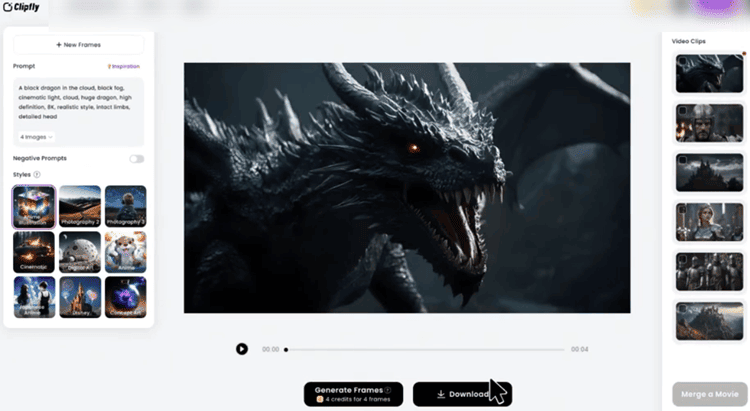
Clipfly’s generation speed is competitive for short clips, especially when you keep resolution settings moderate.
Most clips generated quickly enough for iterative work, although peak traffic can increase wait times.
The platform is clearly optimized for “try, tweak, regenerate,” which is the behavior most creators actually follow.
Pricing and Plans (Breakdown)
Clipfly’s pricing strategy is straightforward: Free (Basic) for editing + limited resources, Pro for creators, Business for teams and high volume.
Plans at a glance
- Basic (Free): $0, 1GB storage, watermark-free exports, up to 1080p, but no monthly credits included.
- Pro: $10.99/month or $49.99/year, 200 credits/month, 4GB storage, access to all models, bigger audio/sticker library.
- Business: $179.99/month or $789.99/year, 4,000 credits/month, 100GB storage, 5 licenses, plus AI Movie.
Clipfly’s best value is clearly Pro Yearly.
At ~$4.17/month effective price, it undercuts many competitors for casual-to-regular creators.
The real cost driver is credits: text-to-video (10 credits/clip) means 200 credits equals roughly 20 clips/month—less if you iterate heavily.
Pricing is only half the story, though. What matters is whether the plan + credits match your posting cadence and how you actually build videos week to week.
How Much Do You Really Need? (Free vs Pro vs Business by Volume)
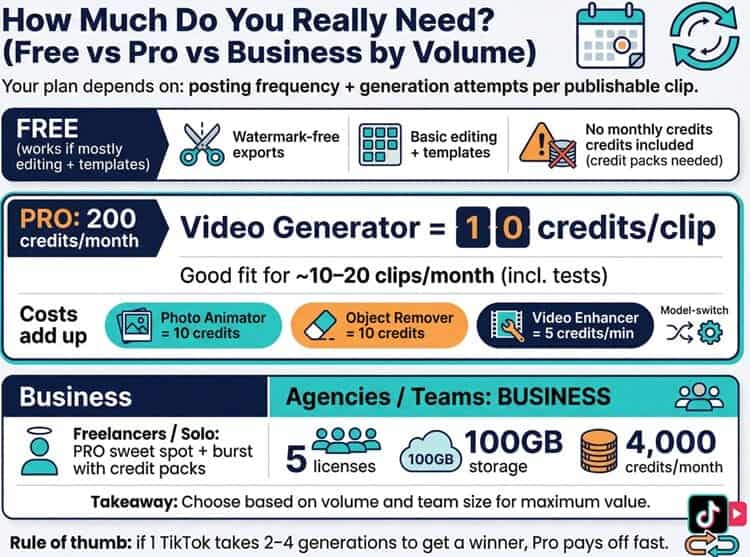
Choosing a Clipfly plan comes down to two variables: how often you post and how many generation attempts it takes you to get a “publishable” clip.
Is Clipfly AI Pro worth it vs the free plan for casual creators (weekly posting)?
If you post once a week, the free plan can work only if your workflow is mostly editing and templates, not constant text-to-video generation.
The free tier is unusually generous on watermark-free exports and basic editing, but the catch is simple: no monthly credits included.
So your ongoing “generation budget” becomes credit packs, and that’s where casual creators often spend more than expected.
For weekly posting, Pro (200 credits/month) is worth it when:
- You expect to generate at least ~10–20 clips/month (including tests), because Video Generator = 10 credits per clip.
- You regularly use AI tools that quietly add up (e.g., Photo Animator = 10 credits, Object Remover = 10 credits, Video Enhancer = 5 credits/min).
- You want consistent access to all models so you can fix a “bad look” by switching engines instead of brute-force re-rolling.
Rule of thumb: if one TikTok post typically takes you 2–4 generations to land the winner, Pro starts to make sense fast, even for “casual” creators.
Business plan vs Pro: what agencies vs freelancers should pick
Freelancers / solo operators: Pro is the sweet spot because it’s priced like a creator subscription, and you can “burst” occasionally with credit packs if a client week gets busy.
Agencies / teams: Business makes sense when you have multiple people generating daily and you need the operational benefits: 5 licenses, 100GB storage, and 4,000 credits/month.
At that scale, the value is less about one perfect video and more about keeping production moving without credit anxiety, especially if you’re delivering multiple variations per client (hooks, CTAs, style tests).
Can Clipfly Reliably Make Viral TikTok Videos (Hooks, Pacing, Captions)?
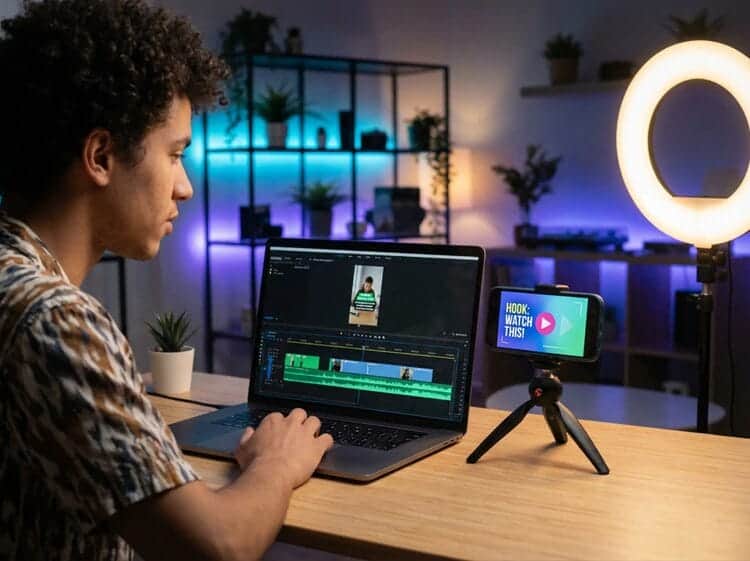
Clipfly can absolutely produce viral-style TikTok visuals—fast motion, trend templates, and punchy, scroll-stopping aesthetics.
Where you’ll still feel the difference versus a dedicated TikTok editor is timing precision.
The built-in editor is “good enough” for:
- captions, quick text overlays, and basic on-beat cuts
- merging multiple clips into a longer sequence
- adding music from the built-in library
You may still want another editor if you need:
- frame-accurate beat edits, advanced keyframing, or motion tracking
- heavy sound design, complex subtitles, or brand template automation
Best workflow: generate the hook shot in Clipfly, assemble 3–6 shots in the browser editor, add auto captions, export, and only “graduate” to a pro editor when a concept proves it’s worth the extra polish.
Which Clipfly AI Model Should You Choose? (Veo vs Flux vs Wan vs Kling vs Seedance)

Clipfly’s advantage is that you can treat models like lenses.
Pick based on outcome, not hype:
- Veo 3: best when you want a more cinematic or realistic feel (product shots, pseudo-live-action promos, “ad-like” lighting).
- Flux: great for stylized art direction—clean, designed looks that work well for brand visuals and bold social aesthetics.
- Wan 2.5: strong “generalist” choice when you want balanced results and quick iterations for short-form ideas.
- Kling: often a good pick for dynamic motion and “wow” transitions—useful when your prompt is action-driven.
- Seedance: ideal for anime/cosplay vibes and more expressive, template-friendly outputs.
If you’re trying to conserve credits, start with the model that matches your end style, then switch only when the look is wrong, not just because a generation is imperfect.
Pros and Cons (Honest Take)
Pros:
Clipfly is genuinely easy to use, and the multi-model access is a differentiator.
You can pivot between cinematic realism and stylized animation without opening another product.
The integrated editor and asset library reduce tool switching, which is a practical advantage for creators producing daily content.
It’s also noteworthy that the free plan exports are watermark-free, which is rare among AI video tools.
Commercial use is allowed, and the platform positions itself as creator-friendly for ads and social posts.
Cons:
The credit system is the biggest catch. If you’re the kind of creator who generates 10 versions of everything, Clipfly can become expensive even on Pro unless you control iteration.
Output resolution caps at 2K, which is fine for social but limiting for high-end film work. However, there is already a hint that 4k is coming soon.
Some “viral” templates, especially AI twerk generator or kissing-style features, can raise ethical and reputational concerns depending on your audience and brand.
Clipfly provides the tools; responsibility lands on the user, and organizations may need internal guidelines before publishing that kind of content.
Use Cases (Who Clipfly Is Best For)
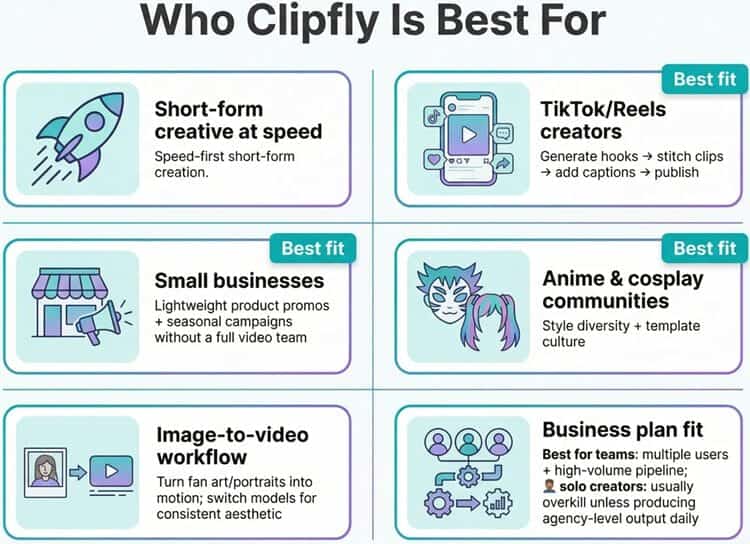
Clipfly makes the most sense when you need short-form creative at speed.
If you’re a TikTok/Reels creator, you can generate hooks, stitch them together, add captions, and publish quickly.
The same is true for small businesses producing lightweight product promos or seasonal campaigns without hiring a full video team.
Anime and cosplay communities will likely enjoy the style diversity and template culture.
Image-to-video workflows are strong for turning fan art or portraits into motion, and model switching makes it easier to land on a consistent aesthetic.
For teams, the Business plan is relevant mainly when you have multiple users and a high volume pipeline.
For solo creators, Business is usually overkill unless you’re producing agency-level output daily.
Comparison With Competitors (InVideo AI, Filmora, Virbo)
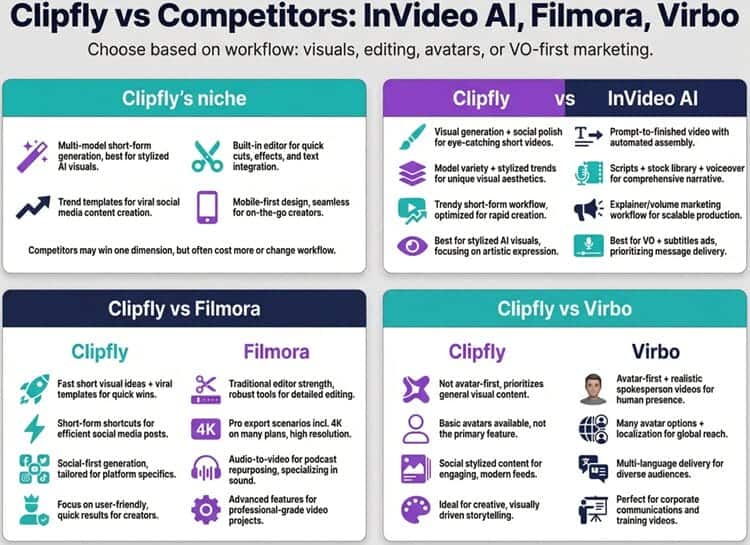
Clipfly sits in a very specific niche: multi-model short-form generation + built-in editor + trend templates + mobile.
Competitors often win in one dimension but cost more or force you into a different workflow.
Clipfly vs InVideo AI
InVideo AI is more “prompt-to-finished video,” leaning into scripts, stock libraries, voiceover, and quick assembly.
It’s excellent for explainer content and volume marketing videos, but it’s also priced higher and the workflow feels more like a video factory.
Clipfly is more “visual generation + social polish.”
If your focus is ads with VO and subtitles from the start, InVideo can be the better fit.
If your focus is AI-generated visuals that feel trendy and stylized, Clipfly’s model variety can be more fun and flexible.
If you’re still deciding, our InVideo AI review breaks down where InVideo’s script-first workflow shines (and where it can feel less creative for visual-first experimentation).
Clipfly vs Filmora
Filmora is stronger as a traditional editor and tends to support more professional export scenarios (including 4K on many plans).
It also emphasizes audio-to-video (a major plus if you repurpose podcasts).
Clipfly is faster to generate short visual ideas and provides more “viral template” shortcuts.
For a deeper look at Filmora’s editor-first strengths (especially if you care about exporting and polishing), see our Filmora AI review.
Clipfly vs Virbo
Virbo is built around realistic avatars and localization.
If you need spokesperson videos, multi-language delivery, and lots of avatar options, Virbo is typically stronger.
Clipfly has avatars, but it’s not an avatar-first platform.
If your main use case is spokesperson-style content and localization, our Virbo review goes deeper into when an avatar-first tool is the more efficient choice.
Expert Opinion (Is It Worth It?)

Clipfly is worth it when you value speed, variety, and convenience over maximum technical control.
The platform is built around the reality of modern short-form production: you need a lot of “good clips,” not one perfect clip. Its multi-model approach is genuinely useful. If one look fails, you don’t have to abandon the platform.
You just switch engines and iterate.
The credit system is the main reason some users will walk away.
Credits are fair in concept, but it’s easy to underestimate how many generations it takes to land on a publishable result.
If you’re disciplined—write better prompts, generate fewer variations, and only upscale final picks—Pro Yearly is one of the best deals in this category.
My practical recommendation: start with the free tier to learn the UI and test editor limitations.
Then move to Pro Yearly if you publish monthly and want consistent access to models and assets.
If you’re running a team pipeline or producing content daily at scale, Business may make sense, especially for the extra licenses and 4,000 credits/month.
Conclusion and Verdict
Clipfly is a creator-first AI platform that balances three things well: fast short-form generation, trend templates, and an editor that’s good enough to finish the job without switching tools.
It’s not the best choice for professional filmmakers who need 4K, deep compositing, or long-scene continuity.
But for social creators, marketers, and anime-style experimentation, it’s an impressive package, especially at the Pro Annual price.
Clipfly is a strong “everyday AI video studio” if you can manage credits intelligently.
If you want an all-in-one workflow that goes from idea to export quickly, Clipfly is easy to recommend.