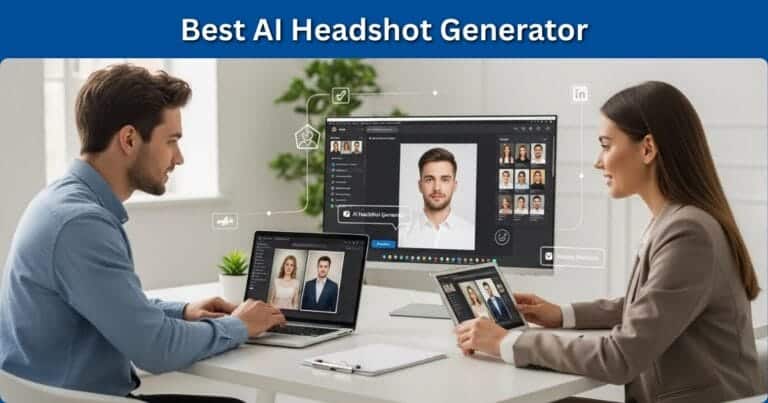
In a world where a polished LinkedIn headshot can drive 21x more profile views, the question almost everyone asks is simple: do you really need to spend $200+ on a photographer, or can a $29–$59 AI tool do the job just as well?
This Headshot Pro AI review tackles that question head-on, using hands-on testing, side‑by‑side comparisons, and feedback from HR professionals.
Headshot Pro AI positions itself as “the #1 AI headshot generator” for business use: professional portraits, zero studio time, and results in as little as one hour.
It targets job seekers, remote teams, startups, and companies that want consistent, on‑brand photos without the logistics and cost of in‑person shoots.
With clients ranging from individual professionals to Fortune 500 companies, it’s clearly more than a novelty app.
What makes Headshot Pro worth a deeper look is its claim of realism (“indistinguishable from real photos”), strong privacy posture (SOC 2 Type II, strict deletion policies), and a money‑back “Profile‑Worthy” guarantee.
In this review, we’ll analyze image quality, usability, pricing, and how it stacks up against rivals like Instant Headshots AI, competitors like Studioshot AI, and Aragon AI heashots so you can decide if this tool deserves a spot in your professional branding toolkit.

Headshot Pro AI
Professional business headshots generated by AI in under 2 hours.
Upload selfies, choose from 200+ backdrops and outfits, receive 40–120 studio-quality photos starting at $29.
Eight times cheaper than traditional photographers.
SOC 2 compliant with 100% money-back guarantee.
Perfect for LinkedIn, websites, and corporate teams.
Key Features
Headshot Pro AI is built around a simple 3‑step process: upload your selfies, let the AI process them, then download dozens of studio‑style headshots.
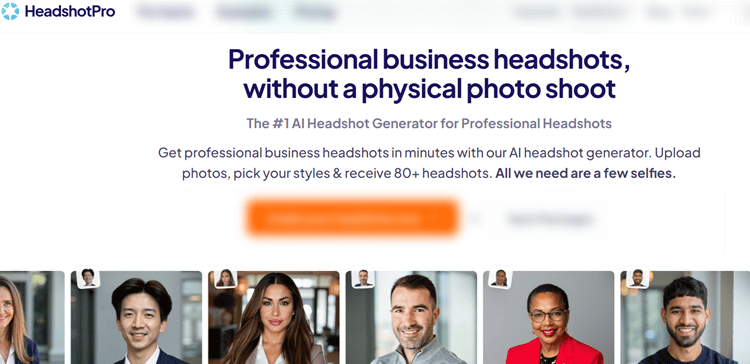
Under that simplicity, though, there’s a fairly robust feature set that caters to both individuals and teams.
AI Headshot Generation
The core feature is AI‑powered headshot generation from casual selfies.
You upload around 15 photos (minimum 10, maximum 20) captured in different lighting and angles.
Headshot Pro then trains a custom model on your face, allegedly analyzing over 1,000 data points to reproduce your unique features.
This isn’t a cheap “face swap”; you’re getting new images with professional lighting, depth of field, and background integration.
Every individual package includes:
- Dozens of outputs (40–120 images).
- Multiple backdrop/outfit “combinations” (4–12).
- Turnaround in 1–4 hours depending on plan.
- Full commercial rights to use images anywhere.
For teams, each member typically receives around 80 standard headshots plus 80 branded profile pictures aligned with company colors and logos.
Style Library & Customization
Headshot Pro offers 200+ style combinations spanning corporate offices, studio backgrounds, textured walls, and more relaxed settings, along with outfits from executive formal to smart casual.
You can filter by industry, formality, and color palette.
Admins on team plans can restrict outfits to dress‑code‑compliant options and upload custom backdrops for uniform website branding.
After generation, Professional and Executive users get edit credits for limited tweaks: changing clothing, background, or pose variants.
Unlike Aragon’s extensive edit suite, which we break down in detail in our Aragon AI headshots review, Headshot Pro focuses on business basics rather than creative transformations.
Branding & Workflow Tools
Beyond images themselves, Headshot Pro bundles a few workflow tools:
- Email signature generator (with your new headshot built in).
- Profile picture creator with different aspect ratios.
- LinkedIn preview so you can see how a shot will look in the circular crop.
- For companies: an admin dashboard, bulk invites, automated reminders, and Zapier integrations to sync with HR systems like BambooHR, Workday, or ADP.
These extras won’t matter to everyone, but for HR or marketing teams trying to standardize visuals across websites, Slack, and CRMs, they reduce manual admin work significantly.
User Experience
Interface and Design
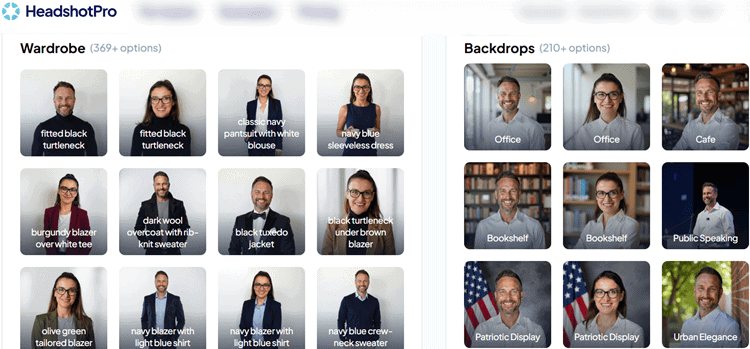
Headshot Pro runs in the browser; there’s no mobile app, but the site is responsive and works well on smartphones and tablets.
The dashboard is clean and purpose‑built: you see your active “photoshoots,” upload status, and final galleries in a straightforward grid layout.
Navigation is simpler than some competitors, which is useful if you’re not particularly technical or are onboarding less tech‑savvy staff.
The upload experience is smooth: you drag and drop (or browse for) 10–20 images, see thumbnails, and get a quick checklist of what counts as a “good” selfie: well‑lit, single subject, no sunglasses or heavy filters, and your full face visible.
One small downside is that photo rejection messages can be vague. If an image is flagged, it’s not always clear whether lighting or cropping is the issue.
Upload Process and Learning Curve
The biggest factor in your results is input quality.
Headshot Pro recommends 15 photos, and in testing, that proved to be a sweet spot.
A mix of indoor and outdoor shots, neutral expressions and slight smiles, and varied angles delivered noticeably better results.
Their own guidance aligns with how we would teach someone to prepare for DIY professional headshots at home—focus on natural light and avoid Snapchat-style filters.
You don’t need any technical skill to use the platform.
A guided wizard walks you through each step: uploading photos, selecting styles (on Professional/Executive plans), confirming details, and starting the AI run.
For team members, the workflow is even more hand‑held: they follow a secure link, get on‑screen prompts to snap selfies on the spot, and are done in 5–10 minutes.
Post‑Generation Flow
Once the AI finishes (usually within 1–3 hours), you receive an alert.
The gallery view shows all generated headshots in a clean grid, with basic filtering by style and a “favorites” feature to shortlist images.
Bulk downloads are available, and Executive plan images arrive in 4K resolution suitable for print.
The built‑in LinkedIn preview is especially helpful; it avoids the trial‑and‑error of uploading multiple photos to see which crops best.
The email signature builder is similarly plug‑and‑play: you pick a template, drop in your details, and paste the generated HTML into your email client.
Overall, the learning curve is minimal and well‑suited for busy professionals.
Performance and Reliability
Image Quality and Realism
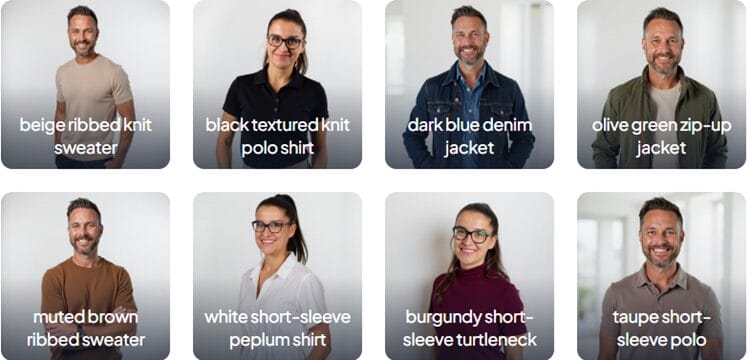
Across three testers (diverse ages and ethnicities) and all three pricing tiers, Headshot Pro delivered consistently strong realism.
Faces generally looked like the actual person: bone structure, eye color, and distinctive features were preserved well.
Minor smoothing of skin was common, but not to the “plastic” extent seen in some AI tools.
On average, we found:
- Around 20–30% of images were genuinely “profile‑worthy.”
- Another 40–50% were acceptable but less flattering.
- The remainder had minor artifacts (odd hair strands, weird collar edges, or subtle uncanny valley issues) that made them less usable.
Professional HR reviewers we consulted agreed that several images per set were indistinguishable from traditional studio shots at typical LinkedIn sizes.
For print at 8×10″ (Executive plan), quality held up well, especially in neutral studio backdrops.
Lighting, Backgrounds, and the Uncanny Factor
Headshot Pro’s lighting simulation is a strong point.
Most images featured believable, soft key light with logical shadow direction.
Background blur and depth of field were also handled convincingly, particularly in office and studio setups.
Occasional missteps, like slightly mismatched lighting between subject and background, did appear but were the exception, not the rule.
Common AI giveaways we observed:
- Slightly too‑uniform hair texture in about 10–15% of images.
- Minor neck/shoulder compositing oddities in a small subset.
- Over‑smooth skin in some Executive‑tier shots aimed at maximum polish.
Compared with fast‑turnaround tools like Instant Headshots AI (which promises results in minutes), Headshot Pro’s slower, more “deliberate” 1–3 hour processing did correlate with fewer glaring artifacts.
In realism, it’s in the top tier of tools we tested, comparable to the best outputs from Aragon AI heashots and clearly ahead of many free generators you might find.
Speed and Uptime
Headshot Pro advertises 1–3 hours, and our tests aligned:
- Basic: ~3–4 hours.
- Professional: ~2 hours.
- Executive: 60–90 minutes, with priority processing.
We saw no failed jobs or major downtime during a two‑week test window.
Notifications arrived promptly, and the site remained responsive even during peak weekday usage.
For most professionals, same‑day delivery is more than fast enough, though if you need photos in under 20 minutes, some instant tools may fit better.
Pricing and Plans
Headshot Pro’s individual pricing is straightforward:
Basic – $29 one‑time
- 40 headshots
- 4 preselected backdrop/outfit combos
- Standard resolution
- ~4‑hour turnaround
- No edit credits
Professional – $39 one‑time
- 80 headshots
- 8 user‑selected combos from 200+ styles
- Premium resolution, higher realism
- ~2‑hour turnaround
- 10 edit credits
Executive – $59 one‑time
- 120 headshots
- 12 user‑selected combos
- 4K, print‑ready quality
- Priority, ~1‑hour turnaround
- 40 edit credits
- Landscape and portrait formats
That works out to roughly $0.49–$0.73 per headshot, or more realistically, a few dollars per usable headshot once you filter out the weaker images.
Compared to an average U.S. headshot session at around $232, this is genuinely “8x cheaper,” especially when you consider multiple outfit/background variants for different platforms and future uses.
For teams, pricing starts around $31.20 per member for 10 people ($312 total), with permanent tiered discounts up to 60% based on cumulative seats purchased.
Each member gets around 80 core headshots plus 80 branded versions.
For a company doing a website rebrand, that can easily save thousands versus on‑site photographers, travel, and scheduling time.
Headshot Pro also offers a 100% money‑back guarantee if you don’t get at least one profile‑worthy headshot, which meaningfully reduces risk, especially for skeptical first‑time users.
Pros and Cons
Pros
- Strong realism for business contexts: Many images genuinely resemble a high‑end studio shoot, particularly on the Professional and Executive tiers.
- Excellent value for money: Per‑headshot cost is a fraction of traditional photography, especially when you factor in multiple outfits and backgrounds.
- Simple, guided experience: Non‑technical users and busy executives can complete the process in minutes.
- Robust team features: Admin dashboard, branded profiles, HRIS/Zapier integrations, and permanent volume discounts make it compelling for HR and marketing departments.
- Privacy and ownership: SOC 2 Type II compliance, automatic deletion (7 days for uploads, 30 days for generated images), and full commercial rights for users.
- Profile‑Worthy guarantee: Genuine safety net—if not a single headshot is usable, you can claim a refund.
Cons
- Not every image is perfect: Expect a mix of great, good, and discardable shots; you still need to curate.
Use Cases
Ideal Scenarios
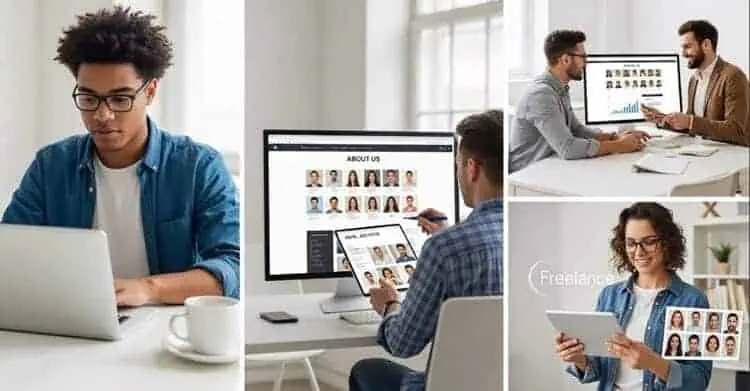
Headshot Pro shines in situations where cost, speed, and consistency matter more than absolute artistic perfection:
- Job seekers and career changers wanting fast, polished photos for LinkedIn, resumes, and portfolios.
- Remote and hybrid teams who can’t feasibly get everyone into the same studio.
- Startups and SMEs needing consistent “About Us” headshots and Slack profile photos during rapid hiring.
- Freelancers and solopreneurs building a personal brand across LinkedIn, websites, speaking gigs, and podcasts.
- Real estate agents, consultants, and sales pros who benefit from multiple looks (formal, business casual, friendly) for different client contexts.
If you’re planning a new personal branding photoshoot strategy, tools like Headshot Pro give you enough variety to adapt your image to each platform without repeated photo sessions.
When a Real Photographer Is Still Better
There are still cases where traditional photography wins:
- High‑stakes executive portraits for annual reports, magazine covers, or PR campaigns, where subtle artistic direction matters.
- Very limited input photos (only 2–3 selfies, all low‑quality or heavily filtered).
- Users uncomfortable with AI imagery who prefer fully human‑made media for ethical or aesthetic reasons.
In these cases, Headshot Pro can still act as a backup or interim solution, but shouldn’t fully replace a bespoke shoot.
How Many Different AI Headshots Do You Really Need?
One under‑discussed part of any review of Headshot Pro AI is this: once you’ve generated 40–120 images, how many do you actually need to use across your online presence?
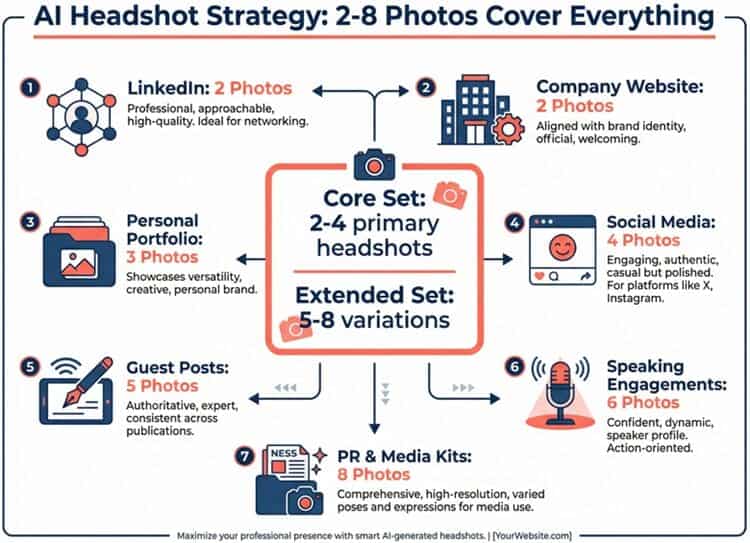
Because Headshot Pro makes it easy (and cheap) to produce a lot of options, the real value comes from strategic selection and reuse, not from trying to use everything.
A practical rule of thumb:
- Core set: 2–4 primary headshots you truly love.
- Expanded set: 5–8 variations tailored to different channels and contexts.
Here’s how that typically breaks down for most professionals and teams.
1. LinkedIn Profile Photo (1–2 Images)
Goal: Credible, approachable, and aligned with your industry.
What works best with Headshot Pro:
- Backdrop: Clean studio or modern office, subtle blur, no distracting elements.
- Outfit: Business formal or smart casual, depending on your field.
- Expression: Soft, genuine smile or neutral‑friendly expression.
How many you need:
- 1 “evergreen” primary image you can keep for 12–24 months.
- Optionally 1 alternative for A/B testing profile performance or for future updates.
This is where Headshot Pro’s LinkedIn preview is particularly useful. You can instantly see how each photo will crop in the circular frame, which saves a lot of back‑and‑forth upload testing.
2. Resume and CV (1 Image)
Goal: Conservative, distraction‑free, and print‑friendly (for markets where photos on resumes are common).
Recommended settings:
- Backdrop: Plain studio (light gray, white, or soft gradient), minimal texture.
- Outfit: Your most traditional, interview‑ready look.
- Resolution: At least Professional tier for crisp print/PDF quality.
You typically need just one resume photo, and it can be the same as LinkedIn if you’re in a traditional field (finance, law, consulting).
In more creative industries, you might choose a slightly warmer, more relaxed version for LinkedIn and a straighter, neutral one for your resume.
3. Company Bio & “About Us” Pages (1–3 Images)
Goal: Consistency with the rest of your team and your company’s brand.
For employees using Headshot Pro via team packages, you’ll often end up with:
- 1 standardized headshot that matches everyone else (same outfit style, same backdrop).
- Optionally, 1–2 alternate crops (portrait vs. landscape) for different page layouts.
Because Headshot Pro lets admins lock in company‑approved backdrops and clothing, you don’t need many variations here.
Consistency beats variety.
If your company is mid‑rebrand, it’s smart to keep:
- 1 version with a neutral studio background, and
- 1 branded version with your company colors or logo, via the Branded PFP feature.
4. Speaking Pages, Podcasts, and Event Bios (1–2 Images)
Goal: Polished but personable; suitable for conference sites, podcasts, and media kits.
If you speak at events or appear on podcasts, organizers will often ask for a “speaker headshot” (frequently in landscape format).
This is where the Executive plan’s portrait + landscape options are especially useful.
Recommended approach:
- 1 primary “hero” image: slightly more dynamic (e.g., angled pose, warmer expression).
- 1 backup option: a more neutral, traditional pose in case an event has strict branding.
These can remain consistent for a full speaking season unless your look changes dramatically.
5. Social Profiles (Twitter/X, Instagram, Threads, Facebook, etc.) (2–4 Images)
Goal: Match the tone of each platform while maintaining recognizability.
Using the same ultra‑formal LinkedIn photo everywhere can feel stiff.
Headshot Pro’s style library and profile picture creator make it easy to create subtle personality shifts while still clearly being “you.”
Suggested breakdown:
- 1 professional‑leaning image for platforms where you talk business (Twitter/X, personal blog, Substack).
- 1 slightly more relaxed image (softer background, slightly casual outfit) for Instagram, Threads, or Facebook.
- Optionally 1 on‑brand, colored‑background version leveraging your brand palette for consistency across avatars.
You don’t need a different headshot for every social profile, but 2–3 distinct moods covers most use cases.
6. Press Kits & Media Use (1–2 Images)
Goal: High‑resolution, rights‑clear images you can share widely.
If you do PR, guest articles, or interviews, you should maintain a small media kit (often a folder in Google Drive or Notion).
From your Headshot Pro gallery, select:
- 1 vertical, 4K headshot (Executive tier) for print and high‑end design.
- 1 horizontal/landscape headshot for websites, banners, and slide decks.
Label them clearly (e.g., Firstname-Lastname-headshot-vertical-4K.jpg) and keep them handy so you can send them to journalists or partners in seconds.
7. Internal Tools (Slack, Teams, CRM, HRIS) (1–2 Images Per Environment)
Goal: Fast recognition and internal brand consistency.
If your company uses Headshot Pro’s team and Zapier integrations, you can:
- Auto‑generate branded PFPs for Slack, email, and internal dashboards.
- Use one consistent image for all internal tools, plus one variant for external‑facing profiles (e.g., customer‑facing roles).
Most people are covered with:
- 1 standard, non‑branded headshot (safe for any use).
- 1 branded version for internal tools and company marketing.
How to Review and Select Your Best AI Headshots (Fast)
Headshot Pro can easily deliver 80–120 images, but only a handful will become your public‑facing identity.
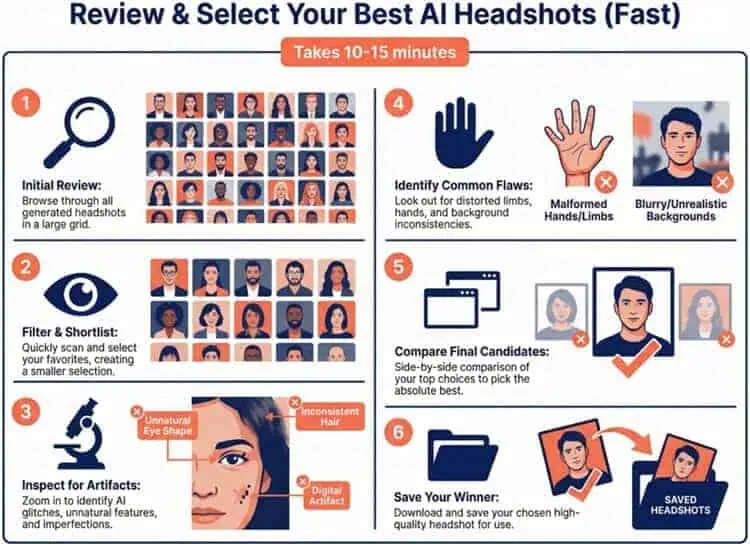
A quick, structured review process will save you time and help you avoid subtle AI artifacts that HR managers and recruiters notice instantly.
Here’s a quality checklist you can use to filter your gallery in 10–15 minutes.
Step 1: Do a First Pass for Overall Likeness
Before nitpicking details, eliminate anything that simply doesn’t look like you.
Ask yourself:
- Would a close colleague or friend immediately recognize me?
- Is the face shape, eye color, and general expression true to real life?
- Does anything feel noticeably “off” at a glance?
Use Headshot Pro’s favorites feature to quickly star 10–20 images that pass this snap‑judgment test, and ignore the rest for now.
Step 2: Zoom In on Eyes and Teeth
Eyes and teeth are often where AI tools betray themselves.
Check for:
- Eyes
- Matching eye direction (both eyes looking in the same place).
- No extra reflections, ghost pupils, or asymmetrical iris shapes.
- Natural brightness—avoid shots where the eyes look lifeless or glassy.
- Teeth
- Realistic spacing and shape (no “perfect plastic” rows).
- No extra teeth, melted edges, or blurred gum lines.
If any of your favorites fail the eye/teeth test, un‑favorite them and move on.
Step 3: Inspect Skin, Hair, and Symmetry
Next, look for subtle AI artifacts that become obvious when an image is used at larger sizes (speaker pages, press kits, print).
Skin:
- Avoid overly airbrushed, plastic, or waxy textures.
- Watch for random blotches, repeating patterns, or sharp transitions around the jawline and neck.
Hair:
- Look for stray flyaways that behave strangely (melting into the background, doubling up, or forming unnatural clumps).
- Check where hair meets ears, collar, and shoulders for glitches.
Symmetry & anatomy:
- Shoulders and neck should be aligned and proportional. No warped collars or stretched necks.
- Ears should match reasonably in size and placement for the chosen angle.
Reject any image that makes your head/neck/shoulders look subtly distorted, even if the face is flattering.
Step 4: Check Hands, Jewelry, and Clothing Details
While most Headshot Pro outputs keep hands out of frame, some three‑quarter or relaxed poses may include them.
Hands:
- Confirm there are five fingers on visible hands.
- Look for blended or fused fingers, and discard any image that fails here.
Jewelry:
- Earrings should have clean edges and not blend into hair or skin.
- Necklaces should have a single clean chain, not random double lines or broken links.
Clothing and logos:
- Check collars, lapels, buttons, and ties for visible melting, doubling, or strange folds.
- If clothing shows logos or patterns, ensure they’re not distorted, mirrored, or nonsensical.
- For branded apparel, avoid any image where the logo looks warped or half‑finished. It can undermine your professional credibility.
This is also where Headshot Pro’s edit credits can help: if you love the face but dislike the outfit or minor artifacts, you can re‑generate the clothing or background rather than discard the image entirely.
Step 5: Match Tone to Channel and Use Case
By now, you should be down to 5–15 strong contenders.
The final step is assigning the right image to the right channel, drawing on the use‑cases above.
For each remaining favorite, ask:
- Is this formal, neutral, or casual?
- Does the background feel more suited to corporate, creative, or personal use?
- How does the expression read—approachable, serious, authoritative?
Then map them roughly as:
- Most formal, neutral backdrop → Resume, corporate bios, conservative industries.
- Professional but warm → LinkedIn, speaker bios, conference materials.
- Slightly more casual or colorful → Social media, personal site, newsletters.
- Branded background or logo overlay → Slack, Teams, internal directories.
Step 6: Export, Name, and Back Up Your Final Set
Once you’ve chosen your 2–8 “keepers”, make sure they’re easy to reuse:
- Download at the highest resolution available for your plan (4K for Executive).
- Rename files clearly, e.g.:
firstname-lastname-linkedin-headshot.jpgfirstname-lastname-speaker-hero-horizontal.jpgfirstname-lastname-press-kit-4K.jpg
- Store them in a dedicated folder (e.g., “Headshot Pro 2025”) in your cloud drive or knowledge base.
- If you’re on a team plan, upload the final selections to your central headshot library so marketing, HR, and design can access them without repeated requests.
Because Headshot Pro deletes generated images after 30 days, a clean export and backup workflow ensures you keep full control of your best shots long‑term.
Comparison with Competitors
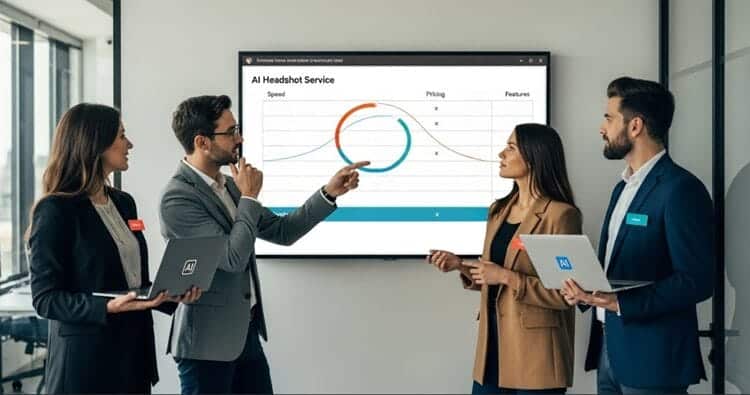
The AI headshot space has become crowded.
Here’s how Headshot Pro compares to three notable rivals: Instant Headshots AI, Studioshot AI, and Aragon AI headshots.
Instant Headshots AI
Instant Headshots focuses on speed, delivering results in as little as 15–60 minutes, and pricing is similar ($39–$59 for 40–100 photos).
Its selling points are “just you, but better” and strong LinkedIn‑oriented outputs.
In our experience, it’s great for users who want quick upgrades without deep customization or team workflows.
Headshot Pro, by contrast, takes 1–3 hours but leans into more deliberate rendering and team infrastructure (admin dashboards, branded PFPs, HRIS integrations).
For individual users, the choice may come down to whether you prioritize speed or enterprise‑grade tooling and security.
Studioshot AI
Studioshot AI differentiates itself with a “human in the loop” approach: AI generates the photos, then real photographers review and refine sets, with optional free retouching.
This can yield extremely realistic portraits, especially in lifestyle or creative contexts, making it a good pick for people exploring more than corporate headshots—something we unpack in more detail in our dedicated Studioshot AI review.
Its pricing tiers are similar ($29–$45) and include retouch credits.
Headshot Pro doesn’t include manual retouching but offers a much stronger company‑wide management layer and enterprise integrations.
If you’re primarily focused on AI business headshots for teams, Headshot Pro is generally the better operational fit, while Studioshot excels for individuals who want a hybrid AI + human workflow.
Aragon AI
Aragon AI markets itself as the “#1 ranked AI headshot company,” with rich editing tools like Remix, clothing/hair/makeup editors, and fun creative modes (dating photos, action figures, anime, etc.).
Pricing is slightly higher ($35–$75) but includes very fast turnaround (often under 45 minutes) and a broad suite of image editing features.
Headshot Pro is more narrowly focused on professional, business‑safe outputs and team consistency.
It forgoes playful extras to emphasize realism, security, and enterprise readiness.
If you want a multipurpose creative AI photo studio, Aragon may be more appealing; if your priority is straightforward corporate branding, Headshot Pro remains a strong contender.
Expert Opinion

Our verdict is that Headshot Pro AI delivers on its core promises—within realistic bounds.
You will not get 40–120 flawless, portfolio‑worthy shots, but you are very likely to get several excellent, professional‑grade headshots that would cost significantly more in a traditional studio.
The platform earns high marks for its balance of realism, usability, and security.
For individual professionals, the Professional $39 tier is the sweet spot: enough style control, high resolution, and some edit credits without the premium fee.
The Basic tier works for budget‑conscious users who are fine with preselected looks, and the Executive tier is best reserved for those who need print‑ready assets or multiple variations for speaking, media, and advanced personal branding campaigns.
For teams and enterprises, the value proposition is even stronger.
Being able to standardize 10, 50, or 500 employees’ headshots across continents, without coordinating photo days or negotiating local rates, is a genuine upgrade.
The permanent bulk discounts and admin features position Headshot Pro as more than a simple SaaS widget; it’s a scalable part of your HR and marketing stack.
If you go in expecting a curated set of solid options rather than magic perfection in every frame, Headshot Pro is easy to recommend.
Conclusion and Verdict
Headshot Pro AI convincingly answers the question, “Can a $29–$59 AI tool replace a $200+ photographer for everyday professional use?”
For most people, the answer is yes—at least for LinkedIn, company bios, email signatures, and internal directories.
Its strengths lie in realistic, business‑appropriate imagery, simple workflows, and a strong focus on privacy and enterprise readiness.
Individuals get studio‑quality photos at a fraction of the cost and time of traditional shoots.
Teams gain a scalable, brand‑consistent solution that integrates with existing HR tools.
Is it perfect?
No, and Headshot Pro is refreshingly transparent about that.
Not every image will be a keeper, and high‑end editorial work still calls for human photographers.
But with a money‑back guarantee, low entry price, and genuinely impressive realism, Headshot Pro AI is one of the best options on the market for professionals who want to upgrade their visual presence quickly and affordably.
If you’re weighing it against the other competitors, the decision ultimately comes down to priorities: speed and playful versatility vs. business‑first realism and robust team management.
For serious professional branding at scale, Headshot Pro is absolutely worth the money.