Video used to be the “expensive but necessary” part of marketing, training, and internal comms. It was either you paid an agency, booked talent, and waited weeks, or you settled for rushed Loom-style recordings that didn’t scale.
AI video generators have changed that tradeoff, but most tools still force you to choose between speed, quality, and enterprise control.
This Synthesia AI review is written for buyers who want a clear answer to a practical question: can Synthesia reliably replace (or dramatically reduce) traditional production for business video?
We tested Synthesia AI across multiple plan tiers and use cases like employee training modules, customer education, multilingual marketing updates, and internal executive announcements to see where it shines and where the fine print matters.
Synthesia positions itself as the “#1 AI video platform for business,” and unlike many AI tools that feel experimental, it’s built to satisfy legal, security, and brand teams.
Still, its credit-based pricing can surprise first-time buyers, and avatar quality varies across the library.
Here’s the honest breakdown.

Synthesia AI
Synthesia AI transforms plain text into studio-quality videos using lifelike AI avatars in 160+ languages — no camera or editing skills needed.
Trusted by Fortune 100 companies, it's the go-to platform for training, marketing, and internal communications teams seeking fast, scalable video production.
Quick Review Summary Card
| Category | Score |
|---|---|
| Ease of Use | 5/5 |
| Avatar Quality | 4.5/5 |
| Feature Depth | 4.5/5 |
| Value for Money | 4/5 |
| Language Support | 5/5 |
| Enterprise Readiness | 5/5 |
| Support Quality | 4/5 |
Best For: L&D teams, corporate trainers, multilingual marketers, enterprise comms teams
Not Ideal For: high-volume social media creators on tight budgets, users needing UGC-style content
Starting Price: Free (no credit card) → $18/mo (Starter) → $64/mo (Creator) → Enterprise (custom)
Verdict Preview: Synthesia is the most polished, enterprise-ready AI video platform, but you must evaluate the credit model before committing.
What Is Synthesia AI?
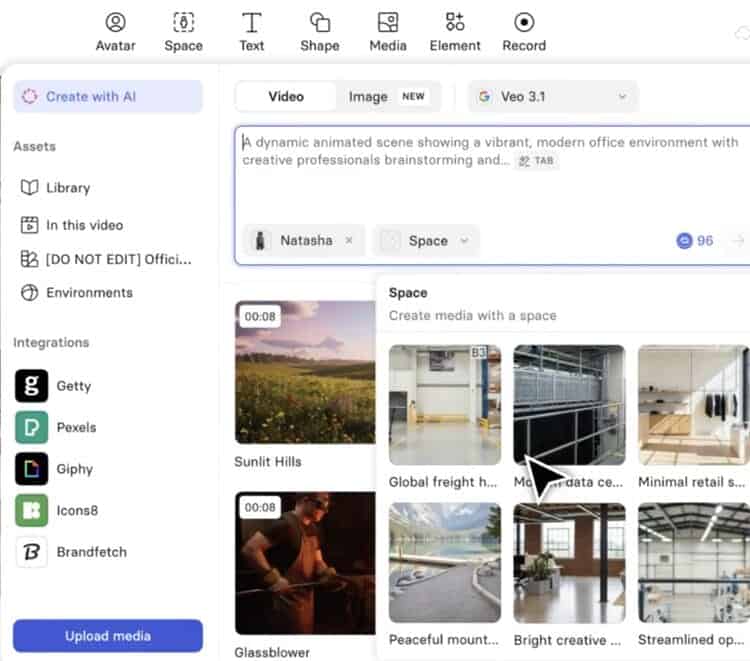
Synthesia is a cloud-based AI video creation platform that turns text into presenter-led videos using AI avatars and synthetic voiceovers in 160+ languages.
The standard workflow is simple: choose an avatar, paste a script, pick a voice/language, and generate.
For most business users, that time-to-first-video matters more than having a Hollywood-grade editing suite. This is where Synthesia is genuinely strong.
The platform’s biggest credibility signal is that it’s built for large organizations: security/compliance posture (SOC2 Type II, GDPR, ISO42001), SSO options on enterprise tier, and a workflow designed around brand consistency and repeatable production.
That matters if your videos must survive legal review and be consistent across departments.
What stood out most was how quickly non-technical teammates could produce something publishable.
Synthesia claims 90% of users publish their first video without a tutorial; that felt believable.
If your goal is “make video production boring and dependable,” Synthesia is the closest to that ideal.
Key Findings
What Synthesia does exceptionally well
- Clean UI with near-zero learning curve
- 160+ languages with convincing lip-sync dubbing
- Enterprise-grade compliance: SOC2, GDPR, ISO42001
- Strong screen recorder with transcript cleanup
- SCORM export for LMS (Enterprise)
What to watch out for
- Credit system can feel restrictive on lower tiers
Key Features (What You Actually Get)
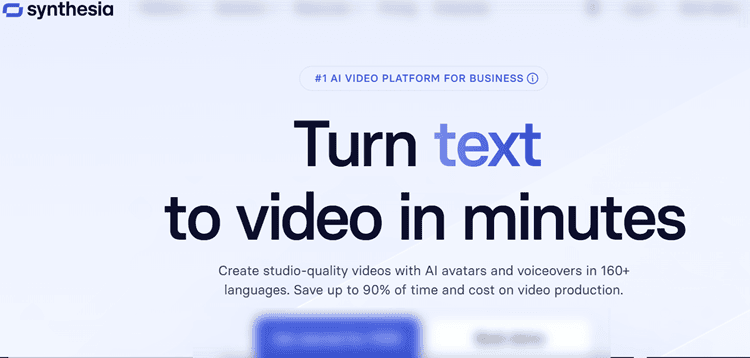
1) AI Avatars (Stock + Personal)
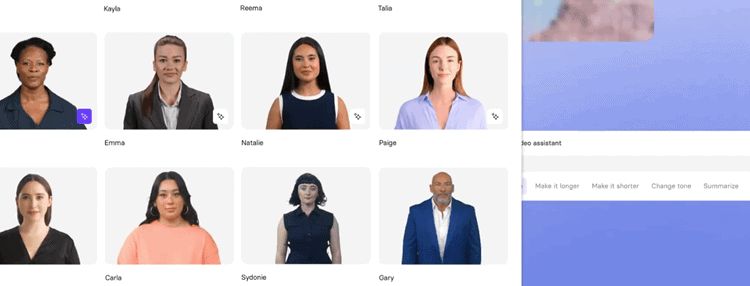
Synthesia’s stock avatars are designed for professional contexts: the “on-camera presenter” format that works for training, product education, and internal communications.
There’s strong diversity across age, ethnicity, and presentation style, and the best avatars look polished enough for corporate use.
The tradeoff is that not every avatar is equally expressive; you’ll likely find a shortlist of “winners” for your brand and ignore the rest.
On Creator and Enterprise plans, personal avatars change the game for organizations that need a consistent on-screen face (e.g., a CPO for product updates, a compliance lead for training).
You record once, Synthesia validates the output, and then you can generate updates without re-shooting.
2) AI Dubbing + Multilingual Output
Language is one of Synthesia’s strongest moats.
AI dubbing doesn’t just generate translated audio; it also syncs lip movements to the spoken language, which looks far more “native” than subtitles alone.
For global organizations, this can cut localization timelines from weeks to hours.
3) AI Video Assistant (Script & Structure Help)
Synthesia’s AI Video Assistant can turn documents, PDFs, and links into a structured script.
It’s not magic—garbage in, garbage out—but for L&D teams sitting on bulky training docs, it’s a major accelerant.
It’s best used as a first draft engine, not the final writer.
You’ll still want a human to tighten language, remove fluff, and align tone with brand voice.
4) Screen Recorder + Transcript Cleaning
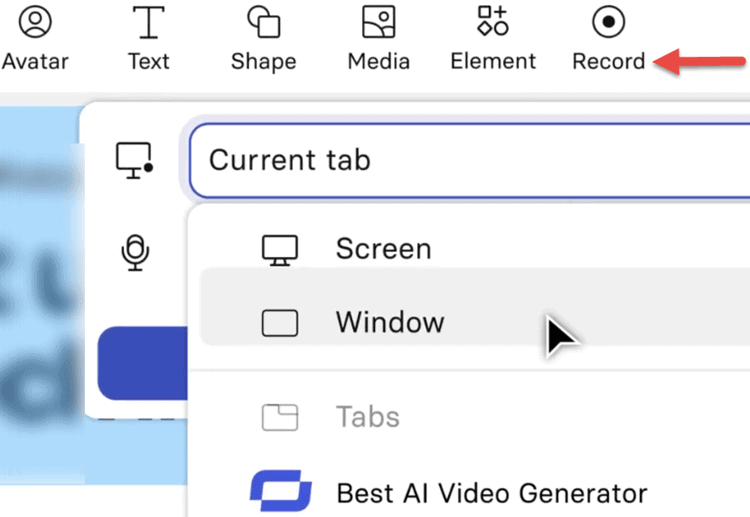
The screen recorder feature is a sleeper hit for software companies and enablement teams.
You can record a walkthrough, instantly generate a transcript, and clean filler words (“um,” “uh”) without manual edits.
Then you can update or translate the same asset later.
5) Analytics, Interactivity, and API (Creator+)
Creator adds the ability to build interactive video experiences (clickable elements, branching) and access an analytics view that supports engagement optimization.
If your training videos are long, being able to spot drop-off points is not a “nice to have”. It’s how you justify improvements over time.
API access matters for teams generating personalized videos at scale (customer-specific onboarding videos, automated sales enablement assets), but it requires developer time.
User Experience (UI, Design, and Learning Curve)
Synthesia’s editor is one of the cleanest in the category.
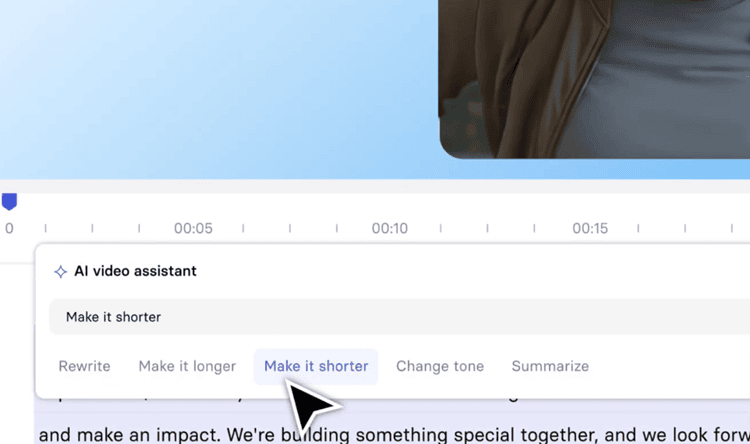
The interface is deliberately not “busy,” which is why the learning curve is so short.
Most teammates will figure out the basics in a single session: select avatar, paste script, preview voice settings, generate.
That simplicity is a competitive advantage when deploying across departments.
The template system is functional, but it’s not the most visually playful tool on the market.
If your team is chasing fast-moving social trends, you may feel constrained compared to consumer-focused editors.
Synthesia’s strength is repeatable business content, not meme-speed creative iteration.
That’s also why it’s common to pair Synthesia with a lightweight editor in post if you need extra flourish.
A practical note: the platform encourages brand consistency, but some customization features (like branded pages and interactive layers) are gated behind Creator.
If you’re a small business on Starter, you can still make strong videos, but you may not get the full “polished distribution layer” without upgrading.
Performance and Reliability (Speed, Stability, Output Quality)
Synthesia runs fully in the cloud, so performance mostly depends on render times and platform stability rather than your laptop’s specs.
Most 3–5 minute videos rendered in roughly 1–3 minutes, depending on complexity and server load.
That’s fast enough to support real operational workflows, not just experimentation.
Reliability is where Synthesia differentiates itself from many “cheap and cheerful” AI video tools.
Projects save cleanly, previous versions are retained, and updates to source videos don’t create a messy web of duplicates.
That version control behavior is particularly important for compliance-heavy training, where broken links and outdated modules can create real risk.
Output quality is consistently business-ready: lighting, framing, and audio are steady.
Synthesia AI Pricing and Plans (What You’re Actually Paying For)
Synthesia’s pricing is straightforward on the surface, but the credit system is the detail that trips people up.
All paid plans are billed annually, and credits are the currency consumed by both video creation and AI dubbing.
| Plan | Price | Credits | Video Minutes | Key Features |
|---|---|---|---|---|
| Basic (Free) | $0/mo | 1,200/mo | ~10 min/mo | 9 avatars, no download, watermark |
| Starter | $18/mo* | 14,500/yr | ~120 min/yr | 125+ avatars, AI dubbing, download, logo removal |
| Creator | $64/mo* | 44,000/yr | ~360 min/yr | personal avatars (5), API, interactive video, branded pages |
| Enterprise | Custom | Custom | Unlimited | SCORM, SSO, brand kits, 240+ avatars, dedicated CSM |
*Billed annually
Understanding the Credit System
A “credit” maps roughly to a second of generated video or dubbing at standard quality.
The big reality check: Starter’s 14,500 credits/year averages to about 10 minutes/month—similar to the free plan’s monthly minutes, but with downloads and business features unlocked.
Creator is the first tier that feels comfortable for regular production at ~30 minutes/month.
If dubbing is your primary use case, plan carefully. A single 5-minute video dubbed into 10 languages can effectively consume ~50 minutes worth of credits.
Now, the real buying question isn’t just ‘what do the plans cost?’ It’s which tier actually holds up once you’re publishing on a cadence.
Starter vs Creator: Which Synthesia Plan Is Best If You Publish Videos Weekly?
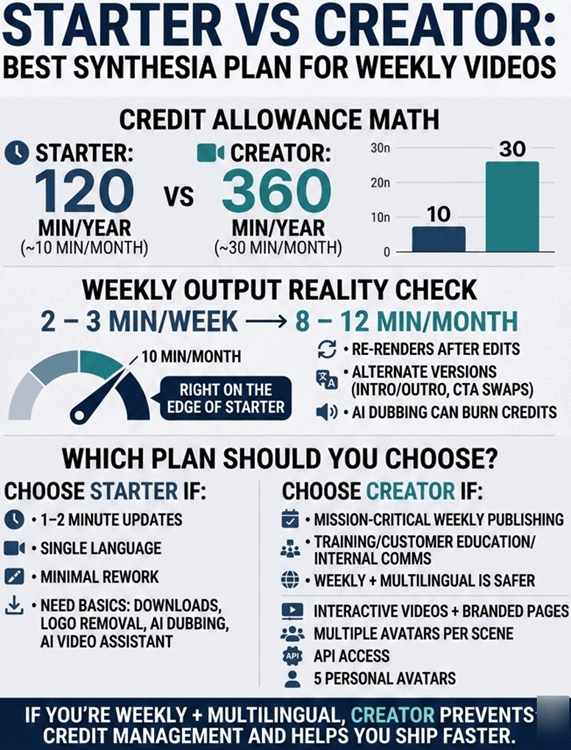
If you’re publishing weekly, the right plan is less about the headline price and more about whether you’ll constantly run into the credit ceiling.
Here’s the practical math based on the allowances above:
- Starter includes 120 minutes/year (~10 minutes/month)
- Creator includes 360 minutes/year (~30 minutes/month)
So if your “weekly video” is 2–3 minutes, you’re looking at roughly 8–12 minutes/month. That’s right on the edge of Starter, and in reality you may go over because weekly production may include:
- re-renders after stakeholder edits
- alternate versions (intro/outro changes, CTA swaps)
- AI dubbing (which can burn credits)
Choose Starter if your weekly output is truly lightweight (e.g., 1–2 minute updates, single language, minimal rework) and you mainly need the “business basics” unlocked: downloads, logo removal, AI dubbing, and AI Video Assistant.
Choose Creator if your weekly publishing is mission-critical (training, customer education, internal comms) and you want fewer constraints.
Creator is the first tier that feels like a repeatable production workflow, especially because it adds:
- interactive videos + branded video pages (useful when distribution and completion matter)
- multiple avatars per scene (better pacing for training)
- API access (automation/personalization potential)
- 5 personal avatars (a consistent on-screen “face” without reshoots)
If you’re weekly plus multilingual, Creator is usually the safer bet. Otherwise, you’ll spend more time credit-managing than shipping videos.
Is Synthesia Cheaper Than Hiring Voiceover + Editor? (Cost Comparison)
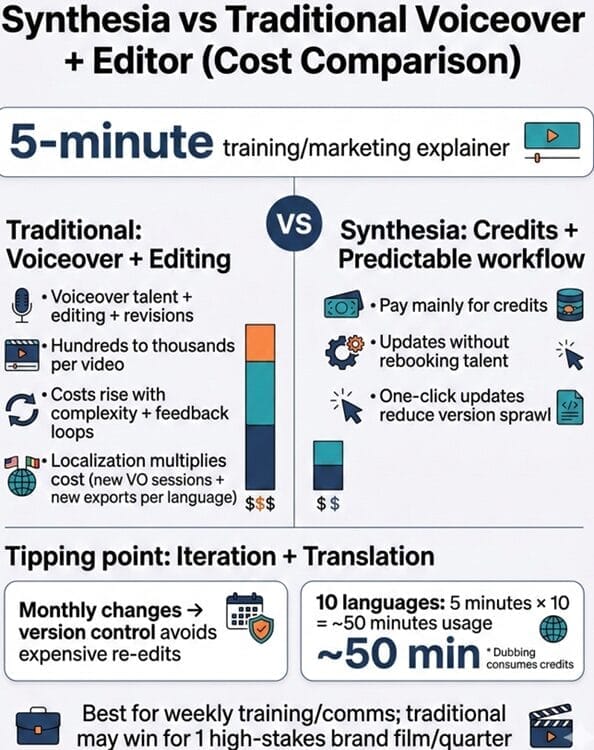
For most business teams, Synthesia is cheaper as soon as you publish consistently, and especially when you localize.
A simple baseline comparison for a 5-minute training or marketing explainer:
- Traditional route: voiceover talent + editing + revisions often runs hundreds to thousands per video depending on complexity, turnaround, and stakeholder feedback loops. Add localization and that cost multiplies quickly (new VO sessions + new exports per language).
- Synthesia route: you’re mainly paying for credits and a predictable workflow where updates don’t require rebooking talent. The cost advantage grows over time because you can update with one-click and avoid “version sprawl.”
The tipping point is usually iteration and translation:
- If a video changes monthly (policy updates, product UI changes), Synthesia’s version control prevents expensive re-edits.
- If you dub into multiple languages, Synthesia can compress what’s normally weeks of coordination into hours. Just remember dubbing consumes credits (a single 5-minute video across 10 languages effectively becomes ~50 minutes of usage).
If you only need one high-stakes brand film a quarter, traditional production may still win. But for weekly training/comms, Synthesia is built for the economics of repeatable output.
Try Synthesia AI free (no credit card required) and generate one real weekly-style video to estimate your actual credit burn before you commit.
Is the Free Plan Genuinely Useful?
Yes.
Mostly because it requires no credit card and gives enough output (10 minutes/month with 9 avatars) to evaluate workflow and baseline quality.
It’s not a production plan for most teams, but it’s a legit sandbox for answering:
“Will our team actually use this?”
and
“Do we like the avatar/voice quality?”
AI Avatar Quality
Synthesia’s avatars are among the most convincing in the market for corporate presenter-style content.
Skin tones, lighting, and facial motion are generally strong, and lip-sync is especially good in supported languages.
Quality variance is real.
Some avatars deliver smoother micro-expressions and more natural pacing than others. In practice, you’ll want to test 5–10 avatars with the same script and choose 1–2 that match your brand tone.
Personal avatars (Creator/Enterprise) are where Synthesia becomes more than a stock library.
The setup takes time because Synthesia reviews the footage and output for safety and quality, but once it’s ready, updates become incredibly fast.
This is ideal for companies that need the same spokesperson across dozens of videos.
Language & Multilingual Capabilities (Where Synthesia Wins)
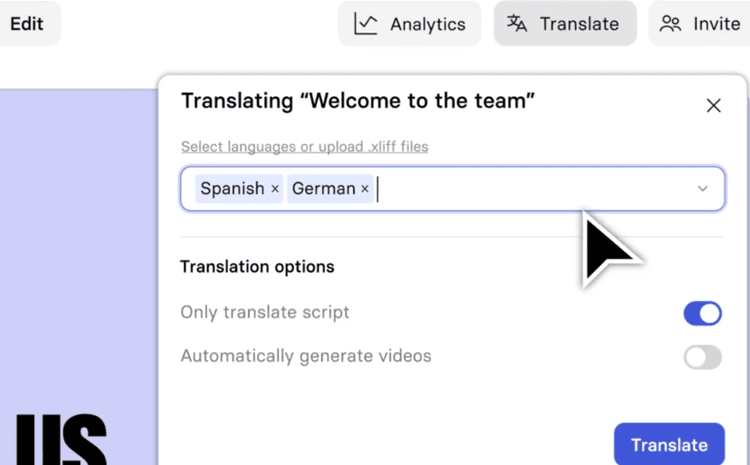
Synthesia supports 160+ languages and makes multilingual production feel native instead of bolted-on.
AI dubbing plus lip-sync is the key advantage: it’s more immersive than subtitles and helps reduce cognitive friction for learners and customers.
Enterprise teams get extra multilingual advantages like 1-click translations into 80+ languages and a multilingual player that allows viewers to switch languages within the same embed.
That’s not just convenience, it reduces asset sprawl and keeps analytics consolidated.
Feature Deep Dive (The Stuff That Matters in Real Teams)
AI Screen Recorder (Best for demos and internal training)
Screen recording with transcript cleanup is a practical differentiator.
It’s the fastest path to usable training content, especially for SaaS onboarding.
You can iterate without reshoots, and the same asset can be localized later.
SCORM Export & LMS Integration (Enterprise)
For L&D teams, SCORM export is a deciding feature. It allows Synthesia videos to slot into major LMS platforms and remain updateable without breaking course links.
If your training is compliance-sensitive, this alone can justify Enterprise.
Interactive Videos + Branded Pages (Creator+)
These are under-discussed value drivers.
Interactive layers can turn passive watching into decision-based learning, and branded pages offer a cleaner distribution experience than uploading files everywhere.
Security & Compliance (The Enterprise Differentiator)

Synthesia is built for environments where security questionnaires and legal audits are part of the buying process.
Key credentials include SOC2 Type II, GDPR compliance, and ISO42001 for AI management systems.
That last one is especially notable because it signals operational maturity around AI governance, not just “we have a privacy policy.”
Enterprise plan buyers can also expect SAML/SSO and options like data residency configurations.
If your organization is in a regulated industry, Synthesia’s compliance posture is one of the clearest reasons to choose it over cheaper tools.
Pros and Cons
Pros:
Synthesia is exceptionally easy to use.
Teams can onboard quickly, and the UI helps non-editors succeed without handholding.
It’s also one of the strongest tools for multilingual video at scale due to its language coverage and dubbed lip-sync output.
Enterprise readiness is a major advantage.
Compliance certifications, SSO, and SCORM export make it viable for large organizations that can’t risk shadow IT.
Cons:
The credit system is the biggest drawback for many buyers.
If you underestimate dubbing usage, you can hit limits sooner than expected.
It’s also not the best tool for raw, UGC-style ads.
If you need “influencer-like” performance creatives, you may be happier with a UGC-focused platform like Tagshop AI when that's the priority.
Best Use Cases (Who It’s For)
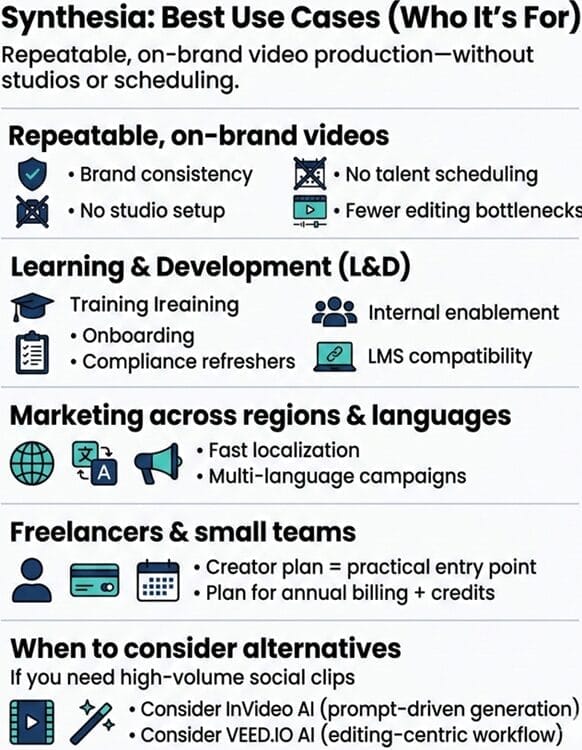
Synthesia is at its best when you need repeatable, on-brand video production without studios, talent scheduling, or editing bottlenecks.
L&D teams doing onboarding, compliance refreshers, and internal enablement will get the most value, especially if they need LMS compatibility.
Marketing teams benefit most when working across regions and languages, where localization speed is a competitive edge.
If you’re a freelancer or small team, Creator is usually the practical entry point for consistent output, provided you’re okay with annual billing and credit planning.
If you’re mostly producing high-volume social clips, it may be more cost-effective to look at what InVideo AI offers for prompt-driven generation, or a closer look at VEED.IO AI for an editing-centric workflow with AI tools layered in.
Comparison With Competitors (Synthesia vs Others)
Synthesia’s core identity is “enterprise business video with avatars.”
That’s different from tools that prioritize generative visuals or social-first editing.
Here’s the simplest way to decide:
- If you want prompt-to-video with lots of stock/generative visuals and fast iteration for content marketing, look at InVideo AI.
- If you want an editor-first platform with lots of AI cleanup features (subtitles, eye contact, background removal) and broader editing flexibility, see VEED.IO AI.
- If you want a massive avatar library and aggressive price competition, Vidnoz AI may be worth considering.
- If your goal is UGC-style ads and direct-response creative variations (TikTok/Meta-ready), Tagshop AI is designed for performance marketing aesthetics rather than corporate training polish.
Customer Support and Learning Resources
Support quality is solid but depends on tier.
Starter includes chat/email support; Creator adds priority support; Enterprise includes onboarding services and a dedicated CSM.
For large teams, that matters because adoption is more about enablement than features.
Synthesia Academy is also a practical value add. It’s not just tutorials. It helps teams standardize how they write scripts for avatars, design templates, and deploy videos internally.
For organizations rolling out company-wide usage, formal training reduces inconsistency and improves output quality.
Expert Opinion

Synthesia is “worth it” if your definition of value is: consistent, scalable business video that doesn’t require cameras, talent scheduling, or long production cycles.
The platform feels mature, and it’s clearly optimized for organizational deployment rather than individual creators chasing viral formats.
The best-case scenario is a team that builds a repeatable library of training and comms videos and updates them continuously using version control.
This is where ROI compounds.
The main caveat is pricing dynamics.
Credits are easy to misunderstand, and the Starter plan can frustrate teams that assume “$18/month = lots of monthly output.”
It’s better viewed as an annual allotment with business-grade upgrades.
Creator is where production starts to feel comfortable, especially if you need personal avatars, interactive elements, or API access.
If you’re unsure, start on free, test 2–3 formats you actually plan to ship, and then calculate credits based on real usage, especially if dubbing across multiple languages is central to your strategy.
Conclusion and Verdict: Is Synthesia AI Worth It?
Synthesia AI earns its 4.5/5 rating because it’s the most polished, enterprise-ready AI avatar video platform we’ve used.
It’s fast, accessible to non-editors, strong in multilingual production, and credible for organizations with real compliance requirements.
If you’re producing training, internal comms, or global marketing enablement videos, it can replace large chunks of traditional production.
It’s hard to beat for localization workflows.
It’s not the cheapest option, and it’s not designed to pump out endless UGC-style social content on a tight budget.
The credit model demands planning, especially if dubbing is heavy.
But for business teams who value brand consistency, governance, and speed-to-update content, Synthesia is absolutely worth shortlisting—and in many cases, adopting.