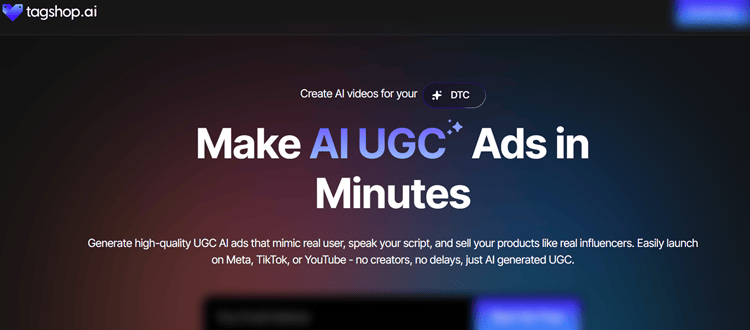
That’s where Tagshop AI comes in: a UGC-style AI video generator built primarily for performance marketers who care more about speed, volume, and “native-to-platform” creative than cinematic polish.
Instead of starting with a blank canvas, Tagshop can generate videos from a product URL, use lifelike avatars (or an AI Twin of you), add auto-captions, and even publish directly into TikTok and Meta workflows.
In this Tagshop AI review, we tested the platform hands-on for 14 days and generated 25+ videos across product demos, testimonial-style ads, and multilingual variants.
The result: Tagshop AI is one of the strongest “UGC ad factory” tools for e-commerce, provided you understand its limits.
Tagshop AI Review Summary (Executive Overview)
Best For: E-commerce brands, performance marketers, agencies needing rapid UGC-style ad variations
Starting Price: Free (15 credits) | Paid from $11/month (annual)
Key Differentiator: URL-to-Video + AI Twin technology + direct TikTok/Meta publishing

Tagshop AI
Tagshop AI transforms product URLs into scroll-stopping UGC video ads using 300+ hyper-realistic AI avatars.
Create professional videos in minutes with voice cloning, 30+ languages, and direct Meta/TikTok publishing.
Generate unlimited ad variations at 98% lower cost than traditional production.
This is perfect for performance marketers and e-commerce brands.
At-a-Glance Verdict
Tagshop AI delivers on its promise of fast UGC-style video creation with surprisingly realistic avatars and practical publishing integrations.
It shines when you need product demo ads, testimonial formats, and lots of hook variations for A/B testing.
If your priority is shipping more “good enough to test” UGC creative quickly, Tagshop is worth serious consideration.
⚡ Quick Recommendation
- ✅ Buy if you need 10+ product videos monthly, run paid social, or want rapid ad variation testing
- ❌ Skip if you need documentary-style narratives, complex animation, or heavy brand motion customization
Background: What Is Tagshop AI (and Why It Matters Now)
Tagshop AI is an AI UGC video tool designed to replace (or drastically reduce) the time and cost of sourcing creators and producing creator-style ads.
Its workflow is built around a simple sequence—script → avatar → export—plus a standout “URL-to-Video” feature that pulls product details from a page and generates scripts and video drafts.
In the broader market, Tagshop AI sits between avatar platforms and creative automation tools built for ads.
The difference is that Tagshop’s output is intentionally UGC-like: it aims to blend into Reels/TikTok feeds, not look like a corporate explainer.
Key Features (What You Actually Get)
1) URL-to-Video Generator (Standout Feature) — Score: 4.7/5
This is Tagshop’s killer feature.
You paste a product URL (Shopify, Amazon, WooCommerce, etc.), and it attempts to extract key product info and visuals, then generates multiple script options and a draft video structure.
In our tests, it successfully pulled usable data from 23/25 URLs.
When it works, it cuts setup time dramatically, often by ~70% compared to building from scratch.
2) AI Avatar Library — Score: 4.5/5
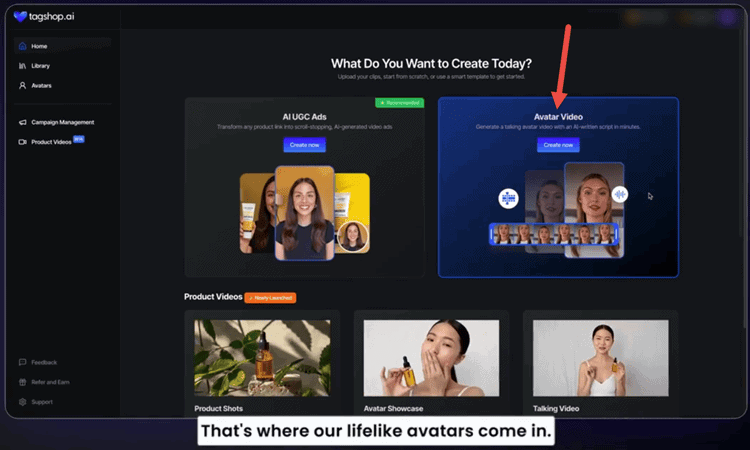
Tagshop includes basic and premium avatars with varying realism levels.
Basic avatars are fine for “functional” B2B-style ads but can show more noticeable AI tells.
Premium avatars look significantly more natural in facial movement and presence.
Lip-sync is generally strong, especially if you keep sentences short (under ~15 words). Fast-paced scripts can occasionally produce micro-stutters or oddly timed mouth shapes.
Clipfly, an alternative video generation tool, leans more toward multi-style AI generation and creative experimentation than performance UGC pipelines.
3) AI Twin (Custom Avatar) — Score: 4.0/5
AI Twin creation requires ~5 minutes of clear video footage and takes a few hours to process.
The likeness can be very good in static shots, but motion can drift into uncanny territory depending on lighting, head movement, and pacing.
Where AI Twin is powerful is brand consistency.
If you want a consistent “face of the brand” without filming weekly, this feature can be a genuine advantage.
It’s best for intros, testimonials, explainer snippets, and product callouts, not nuanced comedy or emotional storytelling.
4) Multi-Language + Voice Cloning — Score: 4.6/5
Tagshop supports 30+ languages (and claims broader language coverage via voice/translation options).
Across eight languages, translation was generally grammatically accurate but more “direct translation” than true localization.
For paid ads, you still want a native speaker to refine phrasing, slang, and cultural context.
Voice cloning is included on paid tiers and captures tone fairly well.
5) Platform Integration & Publishing (Major Advantage) — Score: 4.8/5
Tagshop’s direct publishing into TikTok Ads Manager and Meta workflows is a real differentiator.
It doesn’t just save time; it reduces “format friction” (wrong aspect ratios, caption safe zones, export settings).
InVideo AI, as an alternative tool, often shines for prompt-based, storyboard-like narrative generation, while Tagshop shines for quick UGC ad production and publishing.
6) Built-In Video Editor — Score: 3.8/5
Tagshop’s editor is enough for captions, overlays, trims, and basic music. It’s not a replacement for Premiere or advanced motion tools, and transitions/effects are limited.
For UGC ads, that’s fine. UGC doesn’t need heavy effects.
For brand films, it may not be enough.
If you frequently polish ads post-export, you may also consider a tool like Filmora AI as a practical finishing workflow (especially if you want more advanced editing and effects after generation).
User Experience (Interface, Usability, Learning Curve)
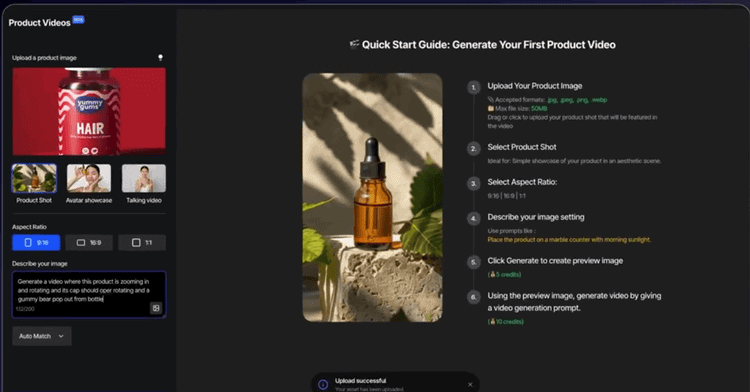
Tagshop’s UI is clean and modern, with a workflow that matches how marketers actually work: you start from messaging, pick a presenter, then export.
The “Script → Avatar → Export” flow reduces cognitive load and keeps the product opinionated (which is a good thing for speed).
Beginner friendliness is high.
In three separate tests with different users, “time to first video” landed around 5–8 minutes once the product URL and basic assets were ready.
The biggest learning curve is not the interface, it’s learning what kinds of scripts work best for AI avatars (short lines, clear structure, less sarcasm, fewer long pauses).
Performance and Reliability (Speed, Output Quality, Consistency)
Output Quality (720p/1080p/4K)
- Free exports at 720p with watermark: adequate for testing and internal review.
- Starter/Growth exports at 1080p: the practical sweet spot for paid social.
- Scale supports 4K: usually unnecessary for TikTok/Reels but useful for repurposing.
Audio quality was consistently clear (AAC, no obvious artifacts). Video compression was reasonable; gradients showed minor banding in some backgrounds, which matters less for UGC formats where backgrounds are simple.
Pricing and Plans (Value for Money)
Tagshop AI pricing is credit-based with Free, Starter, Growth, and Scale tiers.
Annual plans are dramatically cheaper per video than monthly plans, making yearly billing the smart play if you’ll use the product consistently.
Free Plan ($0)
- 15 credits, 1 video, up to 30 seconds, watermark
- 720p export, basic avatars
- Great for evaluating realism and workflow
Starter (Annual: $11/month | Monthly: $29/month)
- Annual credits: 600/year (up to ~60 videos)
- 1080p, no watermark, AI Twin, voice cloning
- This tier is the value sweet spot for many small e-commerce brands
Growth (Annual: $39/month | Monthly: $99/month)
- Annual credits: 2,400/year (up to ~240 videos)
- More avatars, faster rendering, better for agencies and ongoing testing
Scale (Annual: $99/month | Monthly: $249/month)
- 6,000 credits/month capacity, 4K export, dedicated manager
- Best for high-volume operations; monthly pricing is steep
If you’re still unsure which plan maps to your creative cadence, here’s a quick way to choose based on monthly testing volume.
Where This Gets Confusing: Choosing the Right Plan for Your Monthly Testing Volume (10 vs 50 vs 200+ Videos)
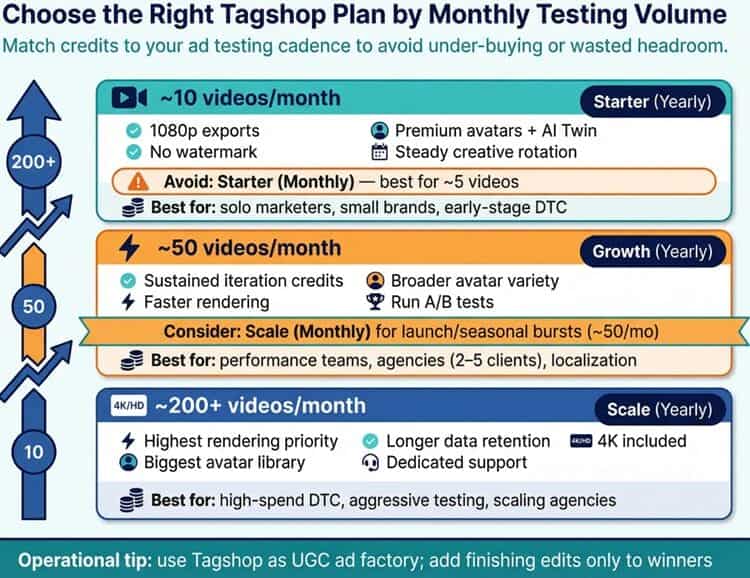
Right after you read a review of Tagshop AI, the next practical question is always the same: which pricing tier actually matches my ad testing cadence?
Because Tagshop is credit-based, it’s easy to under-buy (and stall your iteration loop) or over-buy (and waste headroom).
Below is a simple, marketer-first way to pick a tier based on the number of UGC-style ad variations you need to ship each month.
If you test ~10 videos/month: Starter (Yearly)
If your goal is steady creative rotation, new hooks, new angles, periodic offer refresh—Starter (annual) is the best fit for most small DTC teams.
Why:
- You get 1080p exports (the real baseline for paid social), no watermark, premium avatars, and AI Twin for brand consistency.
- You can run a clean monthly cadence: a few new demos, a few testimonials, and a few “hook-only” variations.
Avoid:
- Starter (monthly) if you truly need 10 videos/month. Its cap is closer to “light testing” (up to ~5 videos), so you’ll outgrow it fast.
Best for: solo marketers, small brands, early-stage DTC, dropshippers with a few winner products.
If you test ~50 videos/month: Growth (or Scale monthly if you refuse annual)
At ~50 videos/month, you’re past “testing” and into creative operations.
You need enough volume to rotate winners before fatigue hits and to run structured A/B tests (hook × avatar × offer × CTA).
Best pick:
- Growth (Yearly) is typically the sweet spot if you can commit annually. There's enough credits for sustained iteration, plus faster rendering and broader avatar variety.
When to consider Scale (Monthly):
- If you’re running intense monthly bursts (launches, seasonal pushes) and want the flexibility of a monthly plan that supports up to ~50 videos/month, Scale (monthly) is the cleanest match. It is just pricier.
Best for: performance teams running multiple ad sets weekly, agencies handling 2–5 active clients, brands doing ongoing localization.
If you test ~200+ videos/month: Scale (Yearly)
Once you’re consistently producing 200+ videos/month, you’re optimizing for throughput and workflow speed, not just unit economics.
Why Scale:
- Highest rendering priority, biggest avatar library, longer data retention, and dedicated support. All of which matter when you’re shipping at volume.
- 4K is included, although most teams will still export 1080p for TikTok/Reels; the real win is operational.
Operational tip:
- At this level, Tagshop works best as your UGC ad factory, with a lightweight “finishing layer” (for example, advanced edits and brand motion) applied only to winners.
Best for: high-spend DTC, aggressive creative testing programs, agencies scaling across many offers/markets.
Pros and Cons
Pros:
Tagshop AI is fast.
The URL-to-Video workflow dramatically reduces the friction of going from product page to ad draft, which is exactly what performance teams need.
The avatar quality, especially premium and AI Twin, is among the better options for UGC-style ads where realism matters.
Direct publishing to TikTok and Meta is a genuine workflow advantage and saves repetitive manual steps.
The pricing (especially annually) is competitive if you’re producing content regularly.
Cons:
Some brand teams may find customization constrained beyond avatar choice, captions, and overlays.
Use Cases (Who Should Use Tagshop AI?)
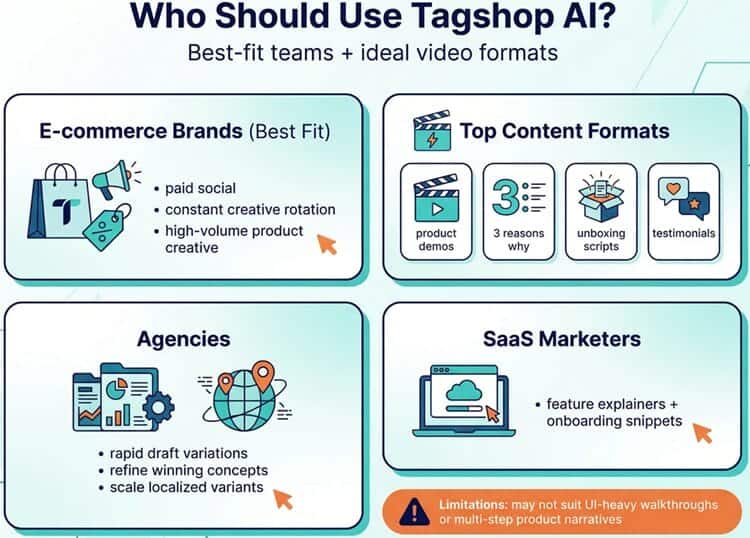
E-commerce brands benefit most, especially those running paid social who need constant creative rotation.
Product demos, “3 reasons why,” unboxing-style scripts, and testimonial formats are Tagshop’s bread and butter.
Agencies can use it to produce draft variations quickly and then refine winners. It’s especially useful for scaling localized variants for different markets without re-shooting content.
SaaS marketers can use Tagshop AI for simple feature explainers and onboarding snippets, but they may hit limits if they need UI-heavy walkthroughs or multi-step product narratives.
Comparison With Competitors (Tagshop AI vs Alternatives)
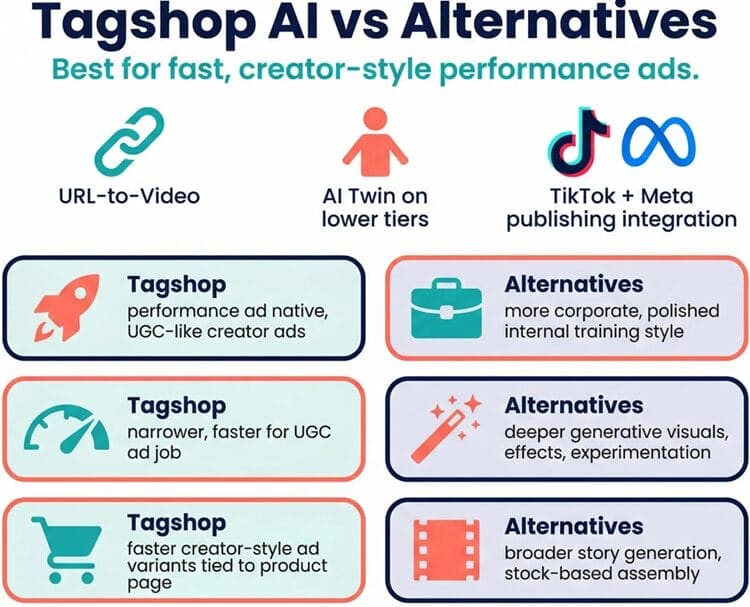
Tagshop AI’s strongest differentiators are URL-to-Video, AI Twin availability on lower tiers, and TikTok/Meta publishing integration.
- Versus avatar-first tools: Tagshop is more “performance ad native” and less corporate. It’s built for quickly making UGC-like ads rather than polished internal training videos.
- Versus creative toolkits: Some platforms offer deeper generative visuals, effects, and creative experimentation; Tagshop is narrower but faster for the UGC ad job.
- Versus prompt-to-video suites: Tools like InVideo can be powerful for broader story generation and stock-based assembly, but Tagshop is often faster to produce “creator-style” ad variants tied directly to a product page.
Future Developments (Roadmap Signals)
Tagshop AI has “competitive insights” listed as coming soon, plus upcoming A/B and variant features per roadmap notes.
If those land with real creative performance feedback loops (winner detection, variant suggestions, fatigue alerts), Tagshop could move from “video generator” to “creative operations platform.”
Expert Opinion (Our Take After 14 Days)

Tagshop AI is best viewed as a throughput tool.
It helps you manufacture large volumes of UGC-style ad creative quickly enough to keep up with modern paid social cycles.
In that mission, it performs very well.
The URL-to-Video feature is not a gimmick. It’s the difference between “we can do this daily” and “we’ll do it when we have time.”
The tradeoff is creative depth.
If your brand relies on elaborate storytelling, comedic timing, cinematic motion, or high-touch art direction, you’ll still need traditional production or heavier editing workflows.
In that scenario, Tagshop becomes a draft generator rather than the full production pipeline.
For most DTC brands and agencies, that’s fine.
Performance marketing rewards testing breadth, and Tagshop’s cost-per-video can enable a volume strategy that small teams simply couldn’t afford with real creators.
Conclusion and Verdict: Is Tagshop AI Worth It?
Tagshop AI is worth it if your success metric is more usable ad variations per week, not “award-winning video.”
It’s one of the better options for producing UGC-style product video ads fast, especially thanks to URL-to-Video, AI Twin, and direct TikTok/Meta publishing.
If you’re running paid social, have multiple products, or suffer from ad fatigue, the Starter annual plan is the best entry point for most teams.
If you’re an agency or scaling variants across offers and markets, Growth is where the workflow really starts to shine.