Video has become the default “trust format” online, but traditional production is still slow and expensive.
Tools like Vidnoz are closing that gap by letting you produce presenter-led explainers and training content without cameras, studios, or on-screen talent.
This Vidnoz AI review focuses on what matters for a buying decision: output quality, speed, the credit system (the real cost driver), and which plan is actually worth paying for.
Vidnoz AI sits in the fast-growing AI avatar video market alongside tools like Synthesia and HeyGen, with a key differentiator: a generous free tier and a very large library of avatars/templates.
It’s also not just “one product.”
Vidnoz is more like a suite—AI Plan (core avatar video), Translation Plan (lip-synced localization + 4K), Voice Plan (TTS and cloning), Gen Plan (creative tools like face swap), plus an API plan for developers.
If your goal is high-volume, consistent, “good enough to professional” videos for training, marketing, onboarding, and internal comms, Vidnoz is compelling.
This is so, especially at the Starter price point.
If you need pristine realism, complex motion graphics, or cinematic editing control, it’s still not that.
Vidnoz AI Review: Executive Summary (Quick Verdict)

Vidnoz AI
Vidnoz AI is an all-in-one AI video creation platform offering 1,900+ avatars, 2,680+ voices, and 3,400+ templates.
Its free plan lets you start instantly, while paid tiers unlock 1080p export, voice cloning, video translation, and team collaboration — making professional video production faster and more affordable.
Overall Rating: 8.3/10
- ⭐ Features: 8.6/10
- ⭐ Value for Money: 8.8/10
- ⭐ Ease of Use: 8.0/10
- ⭐ Output Quality: 7.8/10
- ⭐ Customer Support: 7.9/10
Bottom line:
Vidnoz AI delivers excellent breadth—avatars, templates, and multilingual voices—at a price that undercuts many business-focused competitors.
Best for:
Small businesses, L&D teams, marketers who need volume, and international teams needing multilingual content.
It’s particularly strong if you want to scale presenter-style videos without hiring talent or editors.
Not ideal for:
Brands that require photorealistic “human indistinguishable” presenters every time, complex 3D animation, or absolute control over scene timing and motion design.
If that’s you, you’ll likely want to compare options in our review of Synthesia AI.
At-a-glance pricing (AI Plan)
| Plan | List Price | Credits | Export | Notes |
|---|---|---|---|---|
| Free | $0 | 60/day | 720p | Watermark, 3 min max/video |
| Starter | $19.99/mo (yearly) or $26.99 (monthly) | 450/mo | 1080p | No watermark, emotional voices, SCORM export |
| Business | $56.99/mo (yearly) or $74.99 (monthly) | 900/mo | 1080p | Voice clone, translation, brand kit, analytics, team features |
| Enterprise | Custom | Custom | 1080p+ | API, SSO, dedicated support |
What Is Vidnoz AI?
Vidnoz AI is a cloud-based AI video generation platform built to produce avatar-led videos from scripts and templates.
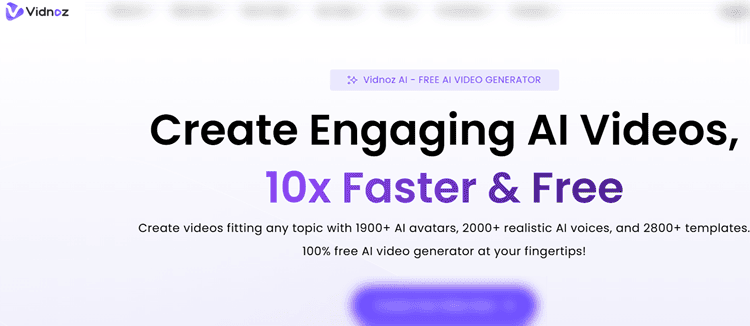
The core workflow is simple: choose a template, pick an AI avatar, select a voice (or clone one on Business), paste your script, and render.
In practice, that makes it well-suited for repeatable, structured content like training modules, product explainers, onboarding sequences, internal announcements, sales outreach, and customer service scripts.
A notable differentiator is how Vidnoz structures the product lineup.
Instead of one “all-in-one” plan, it offers separate ecosystems: the AI Plan for core avatar videos, a Video Translation Plan for lip-synced localization (with 4K export), a Voice Plan for audio-only needs, a Gen Plan for creative experiments (face swap, image-to-video), and an API Plan for developer workflows.
If you’re comparing “one subscription” platforms, you’ll want to consider the total stack.
If you’re building a full marketing pipeline, Vidnoz fits best as the “presenter video engine,” while other tools may complement it for stock-footage-heavy edits.
Learn more about InVideo AI if your content style is more B-roll and captions than avatar presenter.
Primary use cases (and best plan)
| Use Case | Suitability | Best Plan |
|---|---|---|
| Explainer videos | ⭐⭐⭐⭐⭐ | Starter+ |
| Training content | ⭐⭐⭐⭐⭐ | Business |
| Marketing videos | ⭐⭐⭐⭐ | Starter+ |
| Sales outreach | ⭐⭐⭐⭐ | Business |
| Social content | ⭐⭐⭐ | Starter |
| Product demos | ⭐⭐⭐⭐ | Starter+ |
Key Features (Deep Dive)
1) Avatar quality & library (Rating: 8.2/10)
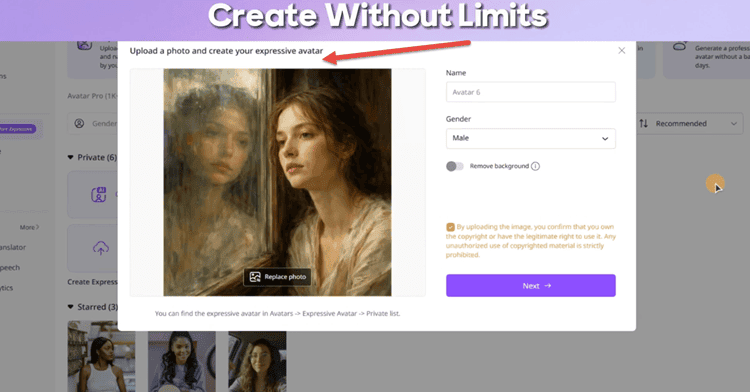
Vidnoz is unusually generous here.
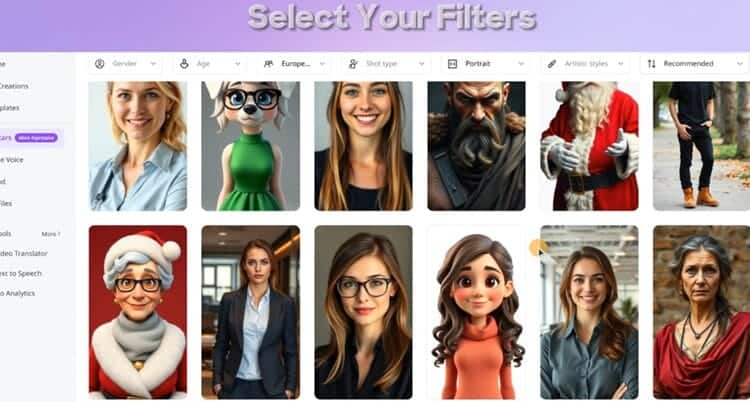
The Free plan already includes 1,800+ avatars, while paid plans reach 1,900+.
That breadth matters because AI avatars are not “one size fits all.”
Some look great in a corporate training scene; others fit better for casual social content.
In our tests, the best results came from choosing avatars that match the intended lighting and pacing: formal avatars for training, more dynamic ones for marketing.
Avatar types you’ll actually use:
- Standard avatars: fine for short announcements, but less expressive.
- Expressive avatars: noticeably better body language and facial dynamics.
- Motion avatars: useful for more energetic delivery.
- Photo avatars: generate an avatar from a photo (best with professional headshots).
Realism strengths:
Lip-sync accuracy landed around 7.5/10 for English scripts. This is good enough for most business use.
Expressive avatars also reduce the “mannequin vibe” that older AI presenters had.
Diversity is solid: age range, ethnic representation, and attire variety cover most standard brand needs.
Tip: Start with expressive avatars, then keep scripts tight.
2) Voice & audio features (Rating: 8.1/10)
Vidnoz’s voice library is one of its strongest selling points: 2,680+ voices across 140+ languages for the AI Plan.
For most business scripts, the default voices are more than good enough, and the inclusion of emotional voices on Starter+ is a meaningful upgrade, especially for marketing hooks, friendly onboarding, or customer success videos.
In real-world usage, English voices scored about 8/10 for naturalness, with strong options across accents.
Spanish and French were close behind, though some voices slipped into a slightly synthetic cadence on longer sentences.
Asian languages were improved versus older generations but still occasionally felt flatter in tone, especially for complex brand messaging.
Voice cloning (Business plan):
Voice cloning is where Vidnoz becomes a “brand system” rather than a generic generator.
Our test clone required a clean sample (30–60 seconds) and produced an 8/10 match. This is convincing for internal content and many public-facing explainer videos.
For high-stakes brand ads, you still need careful QA and pronunciation tuning.
Music/SFX:
The paid plans include a larger royalty-free selection and granular volume mixing.
Sound effects exist but are limited; many teams will still bring their own assets.
3) Templates & customization (Rating: 8.4/10)
Vidnoz markets 3,300–3,400+ templates (depending on plan), and that number is believable.
Template breadth is excellent for corporate and education categories, and it’s strong for quick marketing promos.
The reality, though, is that template quality follows a typical distribution: roughly 30% are genuinely “publish-ready,” 50% are good after small edits, and ~20% feel dated.
What you can customize well:
Text, avatars, voices/language, backgrounds, simple transitions, music, and (Business plan) brand kit elements like logos/colors.
Starter+ also allows up to 15,000 characters per scene, which matters for dense training scripts.
What feels constrained:
Animation timing and certain template motion behaviors are locked.
Advanced kinetic typography and complex graphics aren’t Vidnoz’s wheelhouse.
When we needed more “自由” than templates allow, we got better mileage by building from scratch using text-to-video and then setting a consistent brand layout.
If you want UGC-style ad creative (handheld, influencer-like), Vidnoz templates may feel “too corporate.”
In that case, compare against Tagshop AI before you commit.
4) Video translation & localization (Rating: 8.3/10)
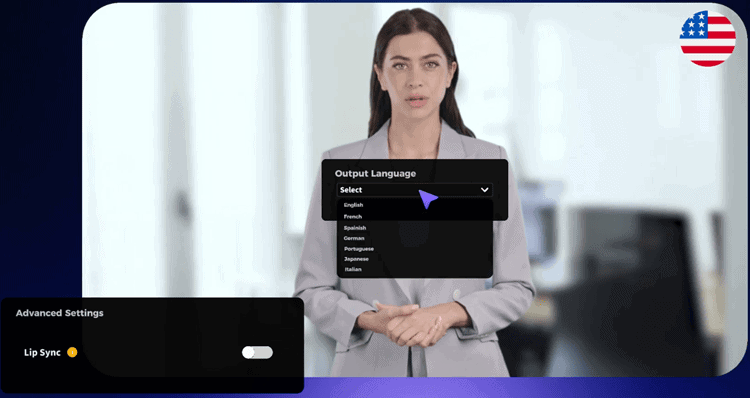
Vidnoz splits translation into a separate Video Translation Plan.
This is important because it includes features the standard AI Plan doesn’t, like up to 4K export and longer lip-sync durations.
Translation Plan Snapshot
| Plan | Cost | Credits | Lip-sync Duration | Export |
|---|---|---|---|---|
| Free | $0 | — | 1 min | Up to 1080p |
| Starter | $22/mo | 450 | 15 min | Up to 4K |
| Creator | $42/mo | 900 | 30 min | Up to 4K |
| Business | $396/mo | 9,000 | 300 min | Up to 4K |
Translation accuracy for major languages tested around 8/10, with strong subtitle generation (about 8.5/10) and decent context handling for straightforward business content.
Lip-sync sits around 7.5/10. This is impressive, but not perfect. For nuanced cultural messaging, you should still do human review.
For global training and SaaS onboarding, this can be a major ROI lever.
5) Vidnoz Gen Plan (creative tools) (Rating: 7.6/10)
The Gen Plan is a separate subscription aimed at creators, not strictly business teams.
It includes face swap (image/video), image-to-video, text-to-video, AI image generation, effects, and music video generation.
If your use case is brand training modules, you can likely skip this.
If you’re making high-volume social experiments or meme-adjacent creative, it’s a handy bundled toolkit.
Pricing ranges from $9.99/month (180 credits yearly) to $29.99/month (800 credits).
The value depends on whether you’d otherwise pay for standalone tools.
Performance & Reliability
Vidnoz is cloud-based, so performance depends on queue load and plan tier.
Starter and Business consistently rendered faster than Free, and exports were stable.
Rendering time still varies by avatar type, scene complexity, and whether you’re doing translation.
For most 1–3 minute videos, the workflow felt efficient: edit → preview → generate → download.
The biggest “time sink” wasn’t rendering, but decision overhead, choosing among thousands of templates/voices.
The platform stays responsive, and we didn’t experience serious downtime, though like any AI service, occasional slowdowns can happen during peak usage.
A practical recommendation is to build a repeatable production system: one template style per content type, a small approved voice set, and a script format that minimizes pronunciation surprises.
Pricing and Plans (What You Really Pay For)
Vidnoz pricing looks simple until you factor in credits.
The AI Plan uses a credit-based system rather than “X minutes per month,” and your real output depends on avatar type and features.
AI Plan pricing overview
- Free: $0, 60 credits/day (~2 minutes/day), max 3 minutes/video, 720p, watermark
- Starter: $19.99/month (yearly) or $26.99 (monthly), 450 credits/month, 1080p, no watermark, emotional voices, SCORM export
- Business: $56.99/month (yearly) or $74.99 (monthly), 900 credits/month, voice cloning, translation, brand kit, analytics, team collaboration, SSO
- Enterprise: custom credits + API + dedicated support
Credit reality (the most important section)
In our tests, 1 minute of video averaged ~30 credits, with expressive avatars costing about 10–20% more.
Starter plan realistic output (450 credits):
- 2-minute standard avatar video: ~60 credits → about 7 videos/month
- 2-minute expressive avatar video: ~75 credits → about 6 videos/month
Free plan reality:
60 credits/day equals about 2 minutes/day, but credits don’t roll over. If you’re consistent, you can produce meaningful volume, just not in bursts.
Which Vidnoz AI Plan Is Best Value for Small Businesses Making Weekly Marketing Videos?
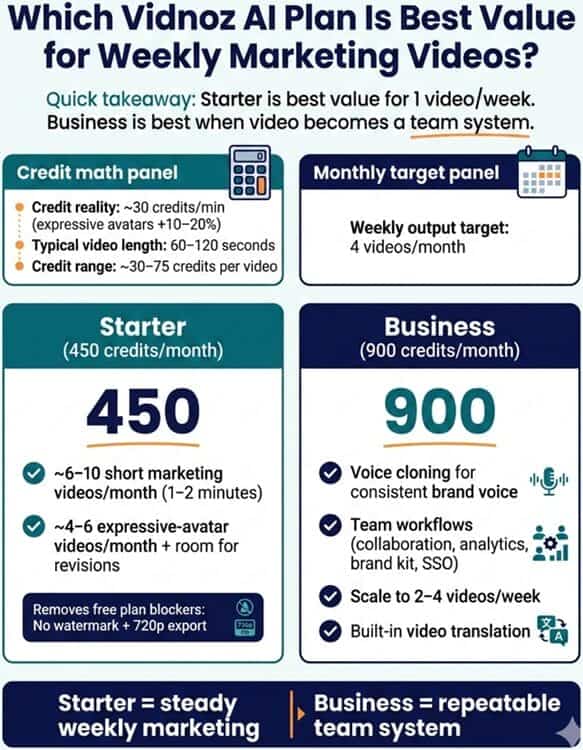
If you’re a small business aiming for one marketing video per week, the Vidnoz AI Starter plan is the best value in most real-world scenarios.
It hits the pricing sweet spot while removing the two biggest “free plan blockers”: watermark and 720p export.
Here’s the practical math using the credit reality from testing (~30 credits/min, with expressive avatars 10–20% more):
- Weekly output target: 4 videos/month
- Typical length (small biz marketing): 60–120 seconds
- Credit range: ~30–75 credits per video (depending on length + avatar type)
Starter (450 credits/month) comfortably covers:
- ~6–10 short marketing videos/month (1–2 minutes each), or
- ~4–6 expressive-avatar videos/month with more “personality,” plus room for revisions.
When Business is worth it (instead of “nice to have”)
Step up to Business (900 credits/month) if any of these are true:
- You need voice cloning to maintain a consistent founder/brand voice
- You require team workflows (collaboration, analytics, brand kit, SSO)
- You plan to scale beyond weekly—e.g., 2–4 videos/week
- You’ll actually use built-in video translation inside the AI Plan ecosystem
Quick rule:
- Starter = best value for steady weekly marketing
- Business = best value when video becomes a repeatable team system (not a solo tool)
Is Vidnoz AI Cheaper Than Hiring Freelancers? (Realistic Cost Comparison)
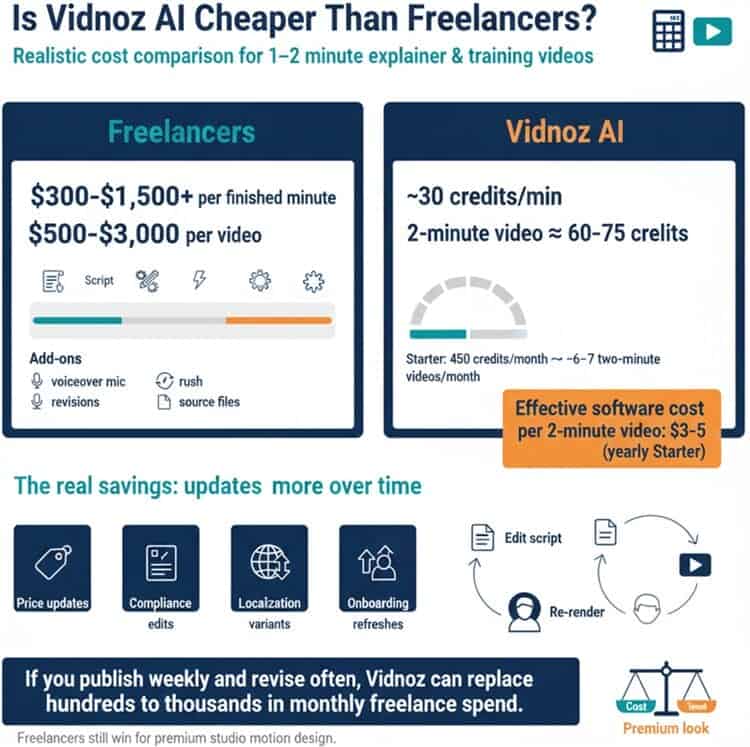
In most cases, yes.
Vidnoz AI is dramatically cheaper than freelancers for explainer and training videos, especially when you factor in revisions and ongoing updates.
Baseline freelancer pricing (typical market ranges)
For a 1–2 minute explainer or training module, small teams commonly pay:
- $300–$1,500+ per finished minute for scripting + editing + motion graphics (varies wildly by complexity)
- Or $500–$3,000 per video for a simple but polished deliverable
Add-ons often increase cost: voiceover talent, rush fees, extra revisions, and source files.
Vidnoz AI cost (subscription-driven)
With Vidnoz, your marginal cost per video is mostly credits + your time.
Using the same tested conversion (~30 credits/min):
- A 2-minute video ≈ 60 credits (standard) to 75 credits (expressive)
- On Starter (450 credits/month), that’s roughly 6–7 two-minute videos/month
- Effective software cost per 2-minute video: about $3–$5 on yearly Starter pricing (before your labor)
The real savings: updates and iteration
Freelancers are expensive not only for first drafts, but for versioning:
- price updates (Q2 pricing change)
- compliance edits (policy wording tweaks)
- localization variants (new region/language)
- onboarding refreshes (new UI screenshots/features)
With Vidnoz AI, those become “edit the script and re-render” tasks. This is exactly where AI avatars are strongest.
Bottom line: If you publish weekly and revise often, Vidnoz typically replaces hundreds to thousands in monthly freelance spend.
If you need high-end motion design or a “premium studio look,” freelancers still win, but you’ll pay for it.
Pros and Cons
Pros:
Vidnoz is one of the best value platforms if you’re focused on avatar-led business videos.
The free plan is genuinely useful for testing workflows, not just a teaser, and Starter removes the watermark while delivering 1080p output.
The library depth like avatars, voices, templates, means you can usually find a “good enough” match without buying extra assets.
The Business plan adds the features that make Vidnoz scalable in a team: voice cloning, brand kit, collaboration, and analytics.
Translation is also a major plus if you operate internationally.
Cons:
The credit system is fair, but it requires planning. If you produce in bursts—say, quarterly training updates—KPI planning matters so you don’t overbuy or underbuy.
Use Cases: Who Should Use Vidnoz?
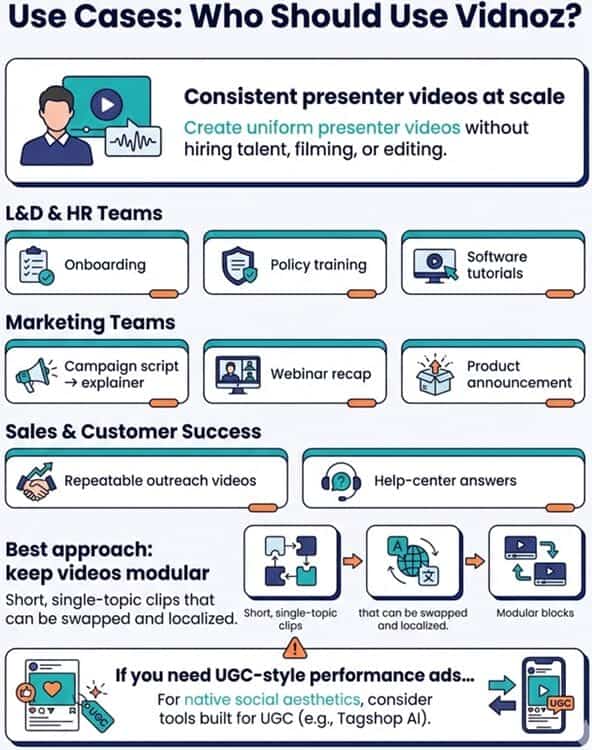
Vidnoz is ideal when you need consistent presenter videos at scale without hiring talent, filming, and editing.
L&D and HR teams can produce onboarding content, policy trainings, and software tutorials that stay uniform across departments.
Marketing teams can also move faster by turning campaign scripts into short explainers, webinar recaps, and product announcements.
Sales and customer success benefit when you create repeatable outreach videos or help-center answers.
The best approach is to keep videos modular—short, single-topic clips that can be swapped and localized.
If your priority is UGC-style performance ads rather than corporate presenter content, you’ll likely get better “native social” output from tools built around that aesthetic—again, see Tagshop AI as a comparator.
Comparison With Competitors (Synthesia vs InVideo AI vs Tagshop AI)
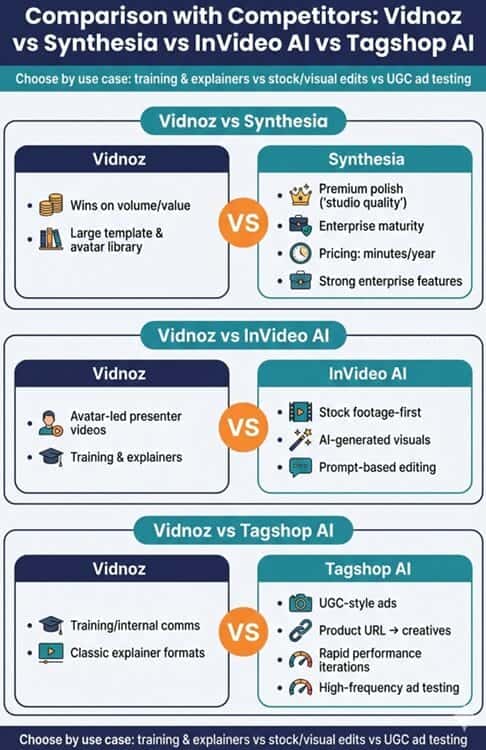
Vidnoz vs Synthesia:
Vidnoz usually wins on volume/value and library size; Synthesia often wins on premium polish, enterprise maturity, and perceived “studio quality.”
Synthesia’s pricing is easier to reason about in minutes/year, and its enterprise features are strong.
Vidnoz vs InVideo AI:
InVideo AI is a different philosophy: it shines when you want stock footage, AI-generated visuals, and prompt-based editing rather than an avatar-led presenter as the core.
Vidnoz vs Tagshop AI:
Tagshop AI is oriented around UGC-style ads, product URLs to creatives, and rapid performance iterations.
Vidnoz is stronger for training/internal comms and classic explainer formats, while Tagshop tends to be better if you run high-frequency ad testing.
Expert Opinion

Vidnoz’s best trait is that it removes the two biggest blockers in business video: cost and throughput.
If you’ve ever delayed training updates because filming was a hassle, or skipped video because your team couldn’t edit fast enough, Vidnoz solves those problems.
The Starter plan, in particular, is priced where even small teams can justify it if video drives sales enablement or reduces support tickets.
Vidnoz is still template-first, and while you can customize a lot, you can’t “art-direct” every motion beat like you would in After Effects.
As regards Avatar realism, a smart workflow is to shortlist 5–10 “approved” avatars and stick to them.
Overall, I’d call Vidnoz a pragmatic tool: it’s not trying to win Cannes, but it can absolutely win your production calendar.
Conclusion & Verdict: Is Vidnoz AI Worth It?
Yes.
Vidnoz AI is worth it if your definition of success is shipping more videos faster while keeping quality at a professional, business-appropriate level.
The free plan is one of the better trial experiences in the market, the Starter plan is strong value, and the Business plan makes sense when you need voice cloning, brand consistency, collaboration, and analytics.
Buy it if you’re producing repeatable explainers, training modules, onboarding, sales scripts, or multilingual content.
Skip it if you need cinematic visuals, advanced motion graphics control, or near-photoreal humans in every shot.
In that scenario, compare premium alternatives before committing.
Try Vidnoz on the free plan first, measure your credit burn for a typical “2-minute” video, then pick Starter or Business based on how many videos you ship per month.